Fees and accounts
College fee management software, from counter to accounts
Collect fees, issue receipts you can trust, close the day cleanly and post to Tally, without re-entering anything.
The usual way
Where fee work goes wrong
-
Receipts and accounts do not match
The counter issues receipts in one place, and someone re-enters them into the accounts later.
-
A wrong receipt is hard to undo
Fixing a mistake means a note, a signature and a manual adjustment, with no clear trail.
-
The day does not close cleanly
Cash, cheques and online payments are counted separately, and the deposit slip is built by hand.
-
Nobody can see who collected what
The accounts head cannot tell which cashier took which payment, or where the exceptions are.
The accounts desk
Everything the fee counter and accounts office do
At the counter
For the cashier collecting fees.
- One search for enrolled students and admission enquiries
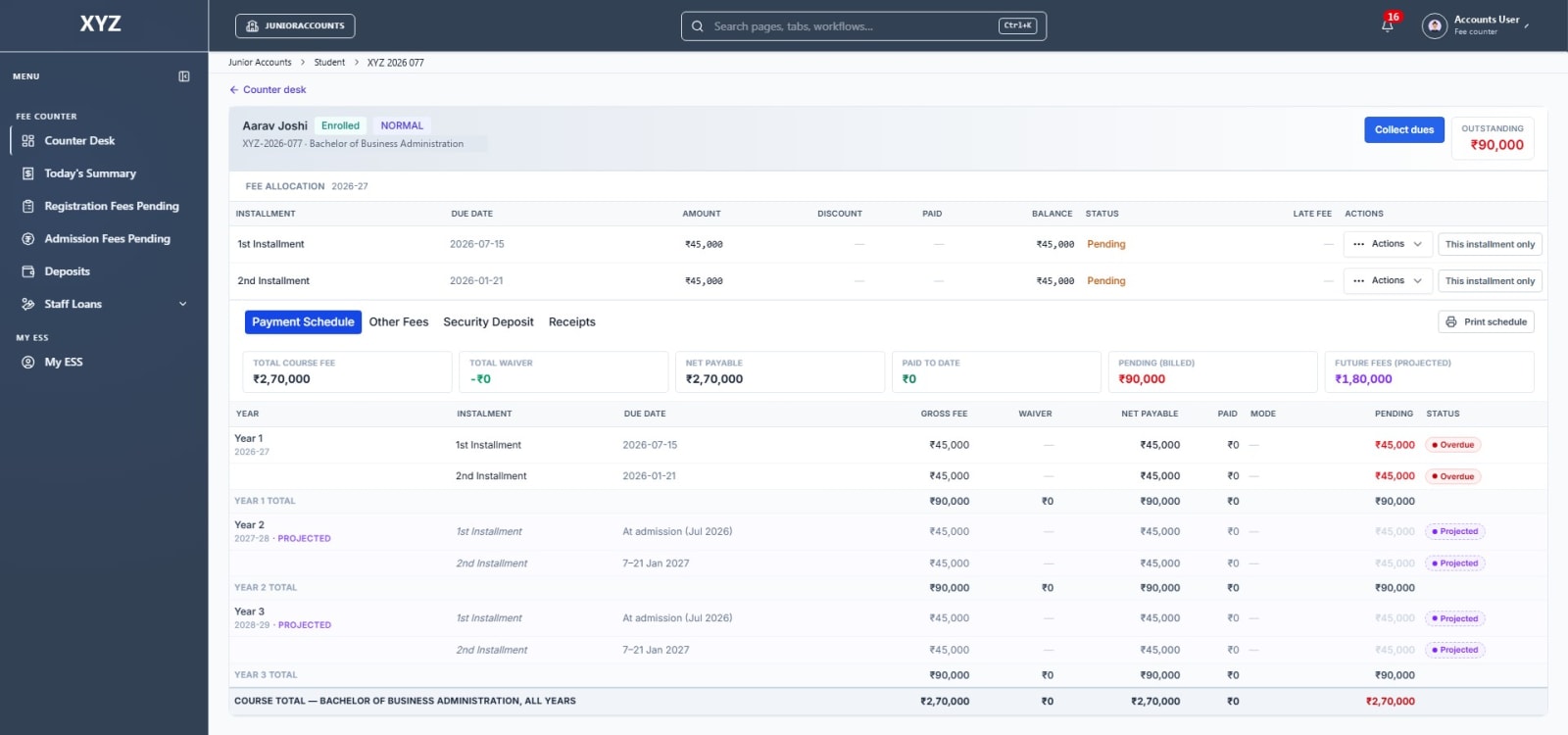
- Installment, registration and admission fees collected against the live fee ledger
- Hostel, transport, library and other fees at the same counter
- A common receipt for any other head, from a student, an employee or an outside payer
- Cash, cheque, UTR and other payment modes on one receipt
- Late fee shown separately from the fee itself
Receipts you can trust
Printed, reprinted and audited.
- Receipts on the college letterhead, as print or PDF
- A receipts register to find and reprint any receipt
- Wrong receipts voided with a reason on file
- A full trail of who issued each receipt and what changed
- A fee payment schedule for the student, to print or save as a PDF
Dues and follow-up
Know who owes what, and chase it.
- Dues searches by programme and semester, with saved filters
- Pending registration and admission fees in their own lists
- Student fee records: billed, discount, paid and pending
- Fee analytics and a forecast of collections
Discounts, waivers and refunds
Controlled, with a reason on file.
- Discounts and late fee waivers, each with a recorded reason
- Rules for who can waive what
- Refunds with an eligibility check
Closing the day
For the accounts team.
- A day-end summary and printable view
- Collection reports by staff member and programme
- Bank deposits recorded and reconciled
Control for the head of accounts
See the whole counter.
- Collection by each staff member
- A payment-mode breakdown
- An exceptions list for the things that need a second look
Also at the accounts desk
Staff loans and payroll, for the same team.
- Staff loans, with the installment worked out for you
- Exit clearance when an employee leaves
- One-off payroll adjustments
- Loan and payroll reports for the accounts team
For the student
A fee schedule the student can take home
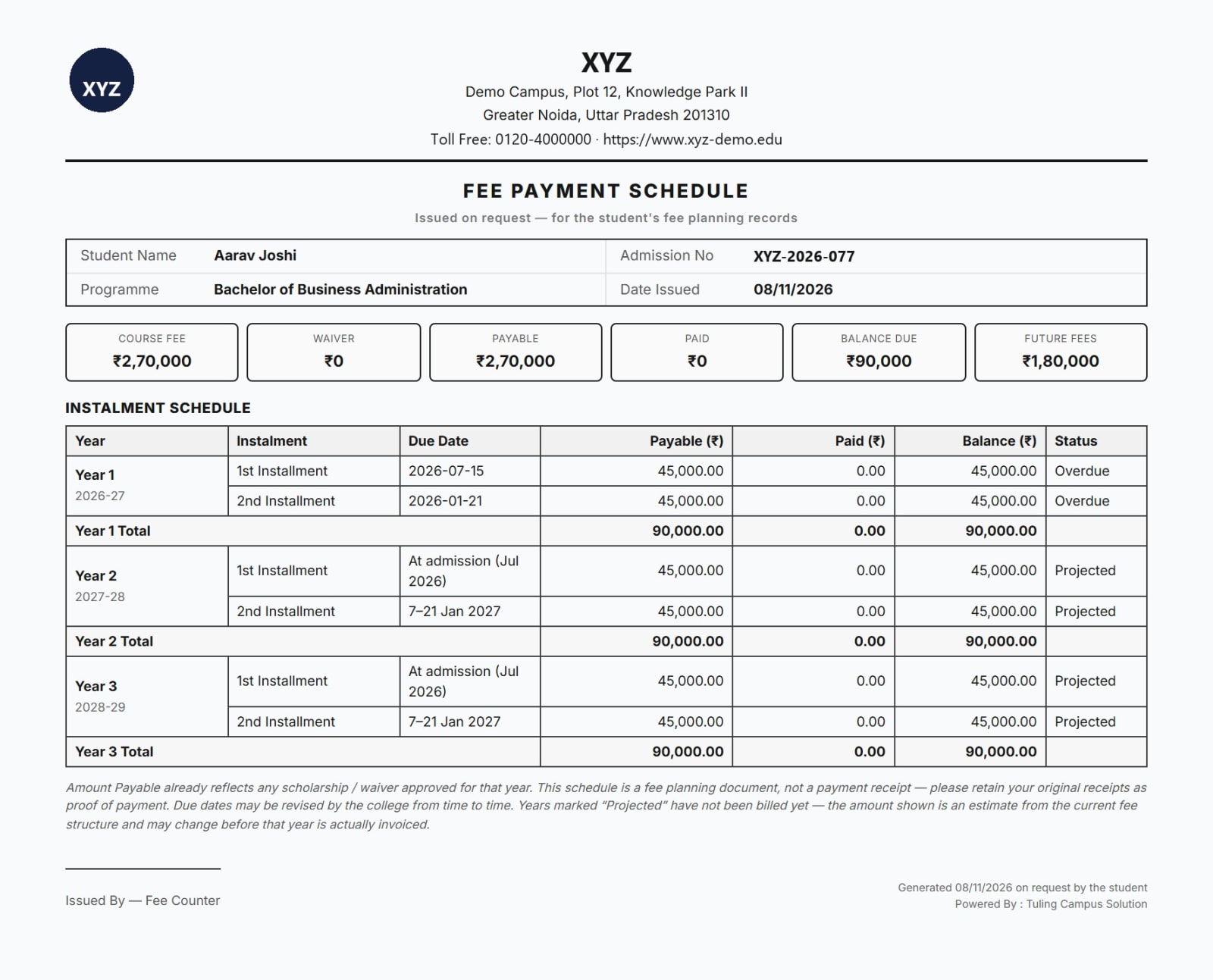
When a student or parent asks what is due and when, the counter prints a clear fee payment schedule on the college letterhead. It can also be saved as a PDF.
- Course fee, waiver, amount payable, paid, balance due and future fees at the top
- Every installment for every year, with its due date and status
- Later years shown as projected, so families can plan ahead
- A note that it is a planning document, not a payment receipt
The fee cycle
From fee structure to your accounts
- 1 Set the fee structure Fee heads, installments and due dates for each programme.
- 2 Bill and track dues Students see their schedule, and accounts sees who is behind.
- 3 Collect at the counter Search, collect, and issue the receipt in one step.
- 4 Close the day Summarise collections, reconcile the deposit and review exceptions.
- 5 Post to your accounts Vouchers go to TallyPrime, with duplicate detection and a log.
The fee counter is part of Tuling Financials, and it uses the same student records as Tuling SIS. Vouchers reach your books through the Tally Connector, and finance packs reach Power BI through BI Connect.
Choosing software
Questions to ask any fee software vendor
Use these with us, and with anyone else you are considering.
- 1Is the late fee shown separately from the fee, on the receipt and in the reports?
- 2Can a wrong receipt be voided with a reason, and does the ledger reverse with it?
- 3Can you see who created a receipt, when, and what changed after?
- 4Does the day-end summary match the receipts, mode by mode?
- 5Who can give a discount or waive a late fee, and is the reason kept?
- 6Does it post to your accounts system, or is everything re-entered?
Questions
College fee management, answered
What is college fee management software?
It is software that handles a college's fee cycle: the fee structure, billing and dues, collection at the counter and online, receipts, day-end closing, and posting to the accounts.
Does it work with Tally?
Yes. The Tally Connector posts fee and payroll vouchers into TallyPrime, with duplicate detection and a log of every run.
Can we print receipts on our own letterhead?
Yes. Receipts print on the college letterhead as a print or PDF.
What if a receipt is entered wrongly?
It can be voided with a reason, and the receipt's history shows who did it and when.
Can we issue a receipt for something that is not a student fee?
Yes. From the counter dashboard you can issue a common receipt for any head, such as fines, damages, event tickets, facility rent, library fines, donations or recoveries, from a student, an employee or an outside payer. It posts to the accounts like any other receipt.
Can a student get a copy of their fee schedule?
Yes. The counter can print a fee payment schedule on the college letterhead, or save it as a PDF. It shows the course fee, any waiver, what is paid and due, and the installments for each year, with later years marked as projected.
Can one receipt take several payment modes?
Yes. A receipt can be split across modes such as cash, cheque and UTR, and the day-end summary counts them by mode.
How are discounts and waivers controlled?
Applying a discount or waiving a late fee needs a reason, and your policy sets who can approve what. The reason stays on the record.
Can we see who collected what?
Yes. The authority-wise collection report shows collections by the person who took the payment and then by programme, and the accounts head has an overview of staff collection and exceptions.
Does it only handle fees?
It is part of Tuling Financials. The same accounts desk also covers general ledger and vouchers, bank reconciliation, staff loans and statutory exports. Fees are one module of a wider college suite.
See the fee counter with your own fee structure
We will walk through a collection, a reprint, a void and the day-end close with your accounts team.