Tuling Campus Ops module
Library Desk & Gate Apps
Two Windows apps for the library — a fast issue and return desk, and a gate kiosk that keeps working when the internet drops.
About this module
Library Desk and Library Gate are the library’s counter tools in Tuling Campus Ops. They sign in with the same accounts as the web platform and wear the same look as the Fee Desk, so a librarian and a cashier work in the same kind of screen.
One fine, two counters
A library fine is a single record. The library can collect it, or Accounts can, and either desk sees the same balance and the same receipts afterwards. Cash taken at the library is held until the weekly handover, when Accounts counts it and receives it in Fee Desk.
Capabilities
Library Desk — issue and return
-
One search bar
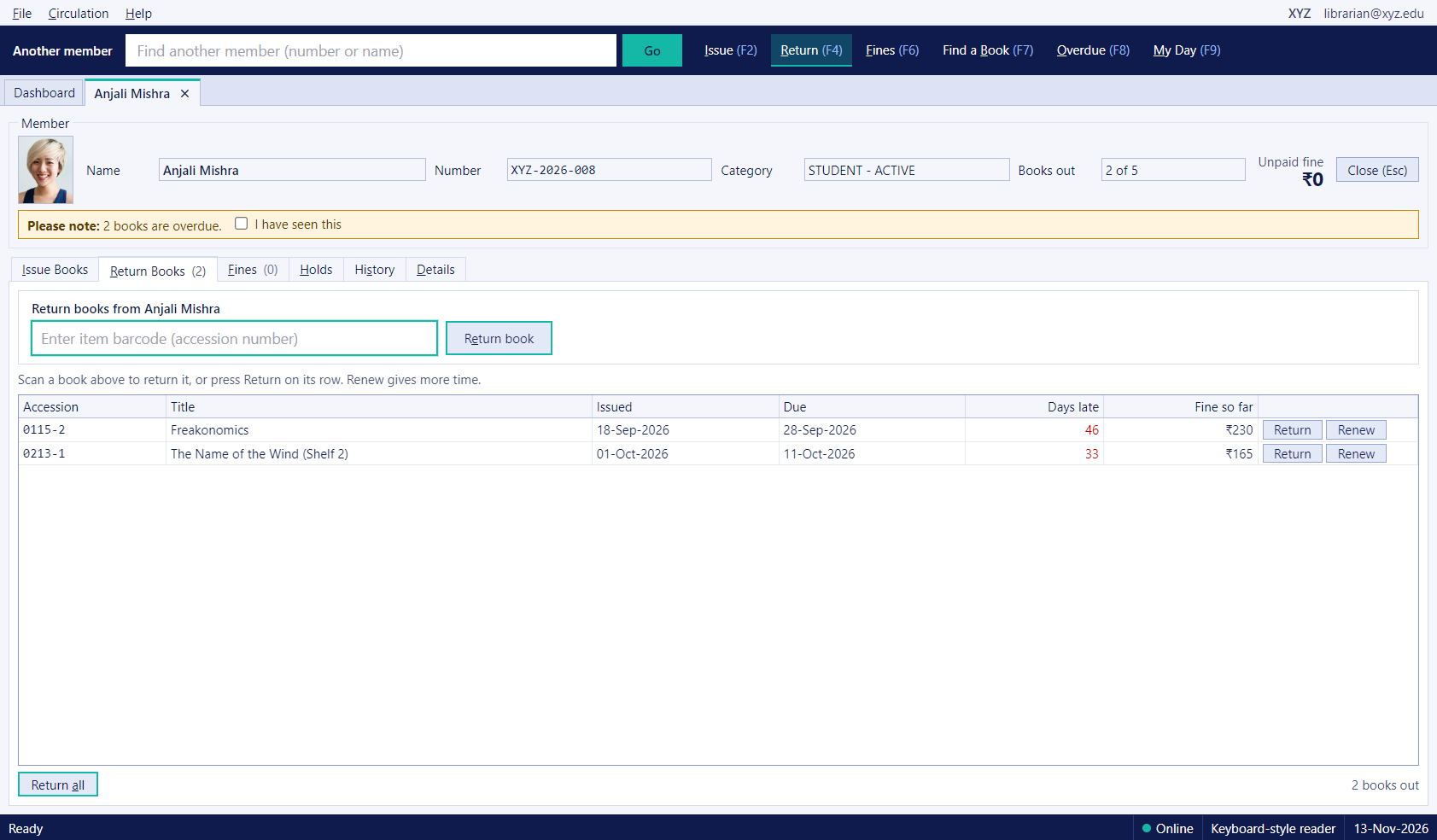
Type a member number, name or accession number. A member opens on their own page, and searching another member replaces it, so the desk never fills with tabs. Issue, Return, Fines, Find a Book, Overdue and My Day sit beside the bar with keyboard shortcuts.
-
Issue and return by scanning
Scan each book into the item box and press Enter to issue. Return by scanning the book from the member's page, renew from its row, or return a stack from any members. Warnings and blocks, such as an unpaid fine over the limit, show before the book is handed over.
-
Holds and history
Place and cancel holds, and see a member's full history of loans, returns and fines on their page.
-
Find a book and overdue list
Search the catalogue by title, author, ISBN or subject with the accession numbers of every copy, and see every overdue book with the member, due date, days late and fine so far.
Fines and cash
-
Collect or waive a fine
Collect a fine in cash, card or UPI, or waive it with a reason. A fine above the limit blocks issuing until it is dealt with.
-
Fine receipts
Each payment gets a numbered receipt in the same style as the fee receipts, with the college letterhead, a QR code, and two copies on one sheet.
-
Pay at the library or at Accounts
A fine is one record. The library can collect it, or Accounts can, and both desks see the same balance and the same paid receipts.
-
Cash held for Accounts
My Day shows the cash fines the library is holding for Accounts, and turns red when the oldest is over a week old. Accounts counts and receives it in Fee Desk once a week, and the entry goes to the books and to Tally.
Library Gate and readers
-
Library Gate that works offline
A scan-in, scan-out kiosk with the member's photo and name, a sound for allowed and one for refused, and a local list of members so entry keeps working when the internet drops. Scans are saved on the computer and sent in order when the connection returns, without double entries.
-
Barcode, QR and serial readers
Readers that type like a keyboard work straight away, and serial-port readers can be switched on in settings. Other hardware, such as RFID gates, can be added as the college needs it.
On every desk
-
Same sign-in and roles
Both apps use the same user accounts and roles as the web platform, so a librarian or a gate keeper sees only what their role allows.
FAQ