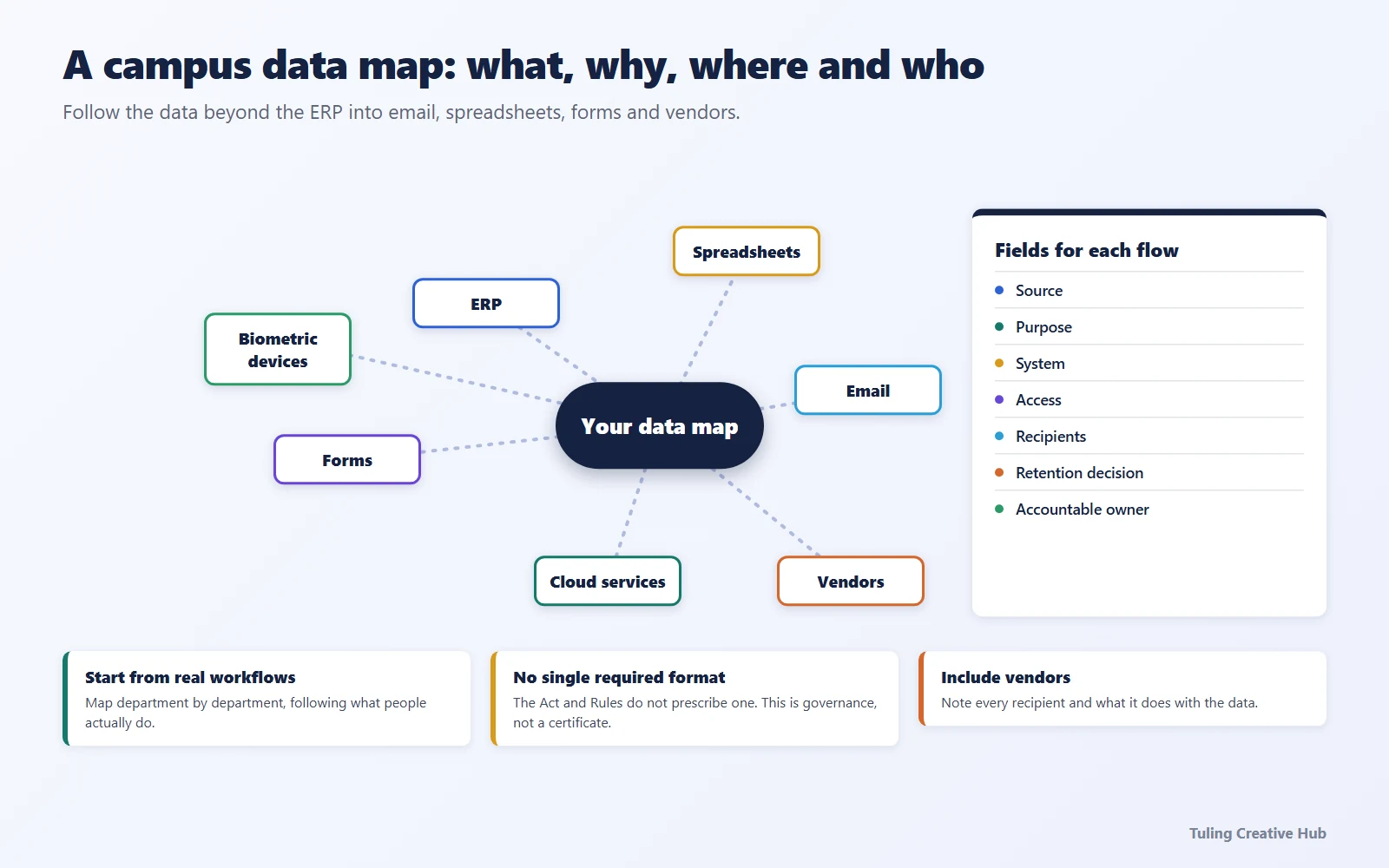
A school or college cannot plan DPDP readiness from an organisation chart alone. It needs to understand how applicant, pupil or student, parent or guardian, staff and alumni information actually moves between forms, departments, software and service providers.
A data map is a practical way to make those flows visible. It is not a legal certificate, and the Act and Rules do not prescribe one universal spreadsheet. Its value is that it gives the institution and its advisers a grounded view of the processing that needs to be assessed.
This draft is designed for schools and higher-education institutions. For the existing college-focused legal overview, see the DPDP Act for colleges pillar. The college DPDP checklist offers a suggested sequence that schools should adapt to their own operations.
What a six-month software pilot surfaced
During a six-month software pilot at one college, an admissions walkthrough surfaced a workflow that is easy to miss in a system inventory: staff kept hard copies of student documents, while the institution had no simple way to track where every copy went or who handled it. The team also had to ask whether a staff member checking for a missing document needed to open the rest of the student’s file, whether an admissions counsellor still needed profile access after the admission handoff, and what the registrar needed to see for fee follow-up.
Those observations are from one anonymized pilot, not a DPDP audit or a finding about every institution. They show why a useful map should cover paper handling as an operational risk as well as digital records in scope: who holds each copy, whether it is later digitised, which roles need the document itself versus a completion status, and when access should change. For paper-only records, keep the DPDP Act’s digital-data scope distinct from broader physical records-management duties.
For example, if the registrar’s task is only to follow up on unpaid fees, a fee-due status may be sufficient; access to admission documents should depend on the registrar’s other assigned duties. A document checklist may only need to show “received” or “missing” to staff who do not need to inspect the file. Map the real task first, then decide the minimum access and evidence needed.
What should a school or college map?
Start with processing that involves digital personal data: information about an identifiable person that is collected digitally or digitised later. Typical campus examples include admissions forms, marks, attendance, fees, staff payroll, hostel records, access logs, CCTV and communications.
Do not stop at the main student information system. Data may also be copied into department spreadsheets, shared drives, email, messaging tools, event forms, payment services and vendor dashboards. Ask staff to describe the actual process, not only the approved process written in a policy.
| Campus activity | What to trace |
|---|---|
| Admissions | Enquiry, application, document upload, verification, selection and unsuccessful applications |
| Student services | Enrolment, attendance, examinations, hostel, transport, health and support requests |
| Finance | Fees, concessions, refunds, scholarships and payment reconciliation |
| Human resources | Recruitment, personnel records, payroll, benefits and exit processing |
| Campus operations | Visitors, access control, CCTV, library use and incident records |
| Communications | Notices, email lists, messaging groups, events, alumni and promotional campaigns |
These are starting points, not a statement that every listed activity has the same legal basis or retention requirement.
What fields belong in a useful map?
Use fields that help the institution make decisions. A spreadsheet can be enough for a first inventory; the quality of the information matters more than the tool.
| Field | Questions to answer |
|---|---|
| Process and owner | Which department runs this activity, and who can confirm how it works? |
| People and data | Whose information is involved, and what categories are collected or generated? |
| Source and collection point | Is it collected on a form, imported from another system, or created during campus operations? |
| Purpose | What does the institution use it for? Are there distinct purposes that need separate assessment? |
| Systems and copies | Where is it stored, exported, backed up or shared? |
| Users and recipients | Which staff roles and external organisations can access it? |
| Processor details | Which provider handles it for the institution, under what arrangement and with which subprocessors? |
| Location and transfer | Where is it hosted or accessed from? Does any transfer need additional review? |
| Retention and deletion | What event ends the purpose, what other obligations may require retention, and how are copies addressed? |
| Safeguards and evidence | What access, security and process controls exist, and what evidence can the owner point to? |
Not every field is a stand-alone statutory recordkeeping requirement. Treat the map as an operational working document and have counsel or a qualified privacy adviser verify the legal conclusions drawn from it.
How can a school or college build the map?
1. Set the scope and owner
Ask leadership to name a programme owner and explain which campuses, departments, systems and populations are in scope. Include affiliated units where the institution controls or participates in the processing; do not assume the contracting entity alone answers every role question.
2. Interview the people doing the work
Speak with admissions, the registrar, examinations, finance, HR, IT, student services, communications and procurement. Ask staff to walk through one real case from collection to use, sharing, archiving or deletion. Compare what happens in practice with written procedures.
3. Follow the data across systems
Trace where a record is entered, who can view or export it, which reports are produced, and whether a vendor or another department receives a copy. Note integrations and manual transfers. A diagram can make complex flows easier to discuss, but keep the underlying inventory searchable.
4. Record questions instead of guessing
If the purpose, role, retention period, consent status, transfer or vendor arrangement is unclear, record the uncertainty and assign an owner and review date. Do not convert an assumption into a legal conclusion just to complete a spreadsheet.
5. Turn findings into work
Use the map to identify missing notices, unclear ownership, undocumented vendor flows, unnecessary access, weak deletion processes and incident-response dependencies. Prioritise by the actual data and context, then assign work and evidence to named owners.
6. Keep it current
Review the map when the institution changes an admissions process, launches a new system, adds a vendor, changes a purpose or discovers a material incident. An annual review can help, but should not be the only update trigger.
How should the map handle vendors?
For each provider, note which process it supports, what data it receives, whether it decides any purposes of its own, who can access the data, where it is processed, and what the agreement says about safeguards, incidents and service exit. A vendor’s marketing label does not determine its legal role; assess the actual arrangement.
The institution should also check that the map reflects reality. A school may use parent communication, transport or learning platforms; a college may use admissions, hostel or examination systems. A contract may list a service that is no longer used, while staff may rely on an unrecorded messaging or file-sharing tool. Follow up with procurement and the relevant department before treating the inventory as complete.
What should happen after the first map?
The first version is a baseline, not a final answer. Review it with department owners, IT and qualified advisers. Use it to decide which notices, consent processes, security measures, vendor terms, rights workflows and retention decisions need attention.
The college compliance checklist provides a suggested sequence that schools may adapt. For a product-specific explanation, see how Tuling ERP can support DPDP work; a system can support records and workflows, but it does not make the institution compliant by itself.
Sources and review note
- Ministry of Electronics and Information Technology, The Digital Personal Data Protection Act, 2023, including sections 2 and 8.
- Ministry of Electronics and Information Technology, The Digital Personal Data Protection Rules, 2025.
It is general information, not legal advice. A data map is an operational planning aid, not proof or certification of compliance.
Frequently asked questions
Is a data map specifically required by the DPDP Act?
The Act and Rules do not prescribe one universal campus data-map template. Mapping is a practical way to understand processing, assign responsibilities and plan safeguards; it does not by itself establish compliance.
What should a school or college include in its data map?
At minimum, record the people involved, data categories, collection point, purpose, systems and copies, users, processors, transfers, retention basis, safeguards and an accountable owner. Tailor the fields to the institution and verify legal requirements.
Should paper files be included?
The Act concerns digital personal data, including information collected on paper and later digitised. A school or college may still track paper-only records for broader records-management purposes, but should not label them automatically in scope under the Act.
Discuss a campus data-map review
Tuling offers operational DPDP readiness audits and implementation support for education institutions. The initial consultation is free; a full audit and implementation engagement are paid and scoped after discussion. We help institutions work toward compliance, but do not provide legal certification or guarantee an outcome.
Request a free consultation- DPDP Act
- Data mapping
- Education compliance
- Student data