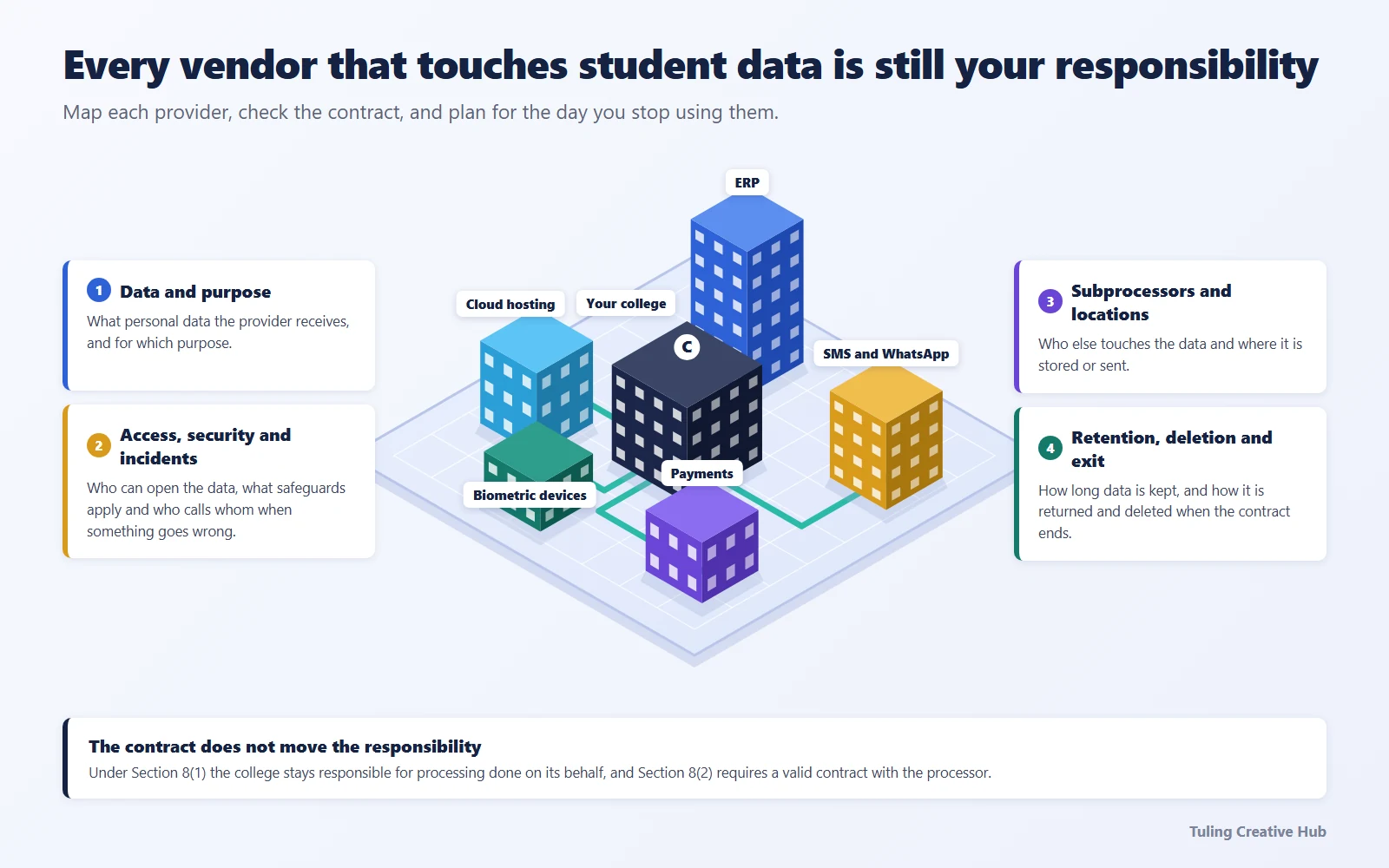
Schools and colleges often depend on a network of providers: student information and learning systems, admissions tools, parent communication apps, payment gateways, cloud storage, transport or access services, messaging, biometric systems and support vendors. Each may touch a different part of a pupil’s, student’s, parent’s or staff member’s record.
The institution needs to know what is shared, why, under what arrangement and what happens if the service changes or an incident occurs. Vendor due diligence is not a one-time procurement form; it is part of the institution’s ongoing data governance.
This draft is designed for both schools and higher-education institutions. For college-specific legal context, see the DPDP Act for colleges pillar. Start with the broader school and college data map; the existing college DPDP checklist may need adapting for schools.
First identify the actual role
The Act uses terms such as data fiduciary and data processor. A school, college, trust, society or another institution may be the fiduciary for processing whose purposes and means it determines; a provider may process data on the institution’s behalf. A provider can also have its own purposes for some processing. The actual activities matter more than a label in a proposal.
Section 8(1) addresses the fiduciary’s responsibility for processing undertaken by it or on its behalf by a processor. Section 8(2) requires a valid contract with a processor. Get qualified advice to review how those provisions apply to the institution’s particular structure and contract.
Build a vendor inventory
Start from department workflows and data mapping rather than a purchase-order list. Include both major platforms and smaller services used by staff.
| Provider type | Possible campus flow to examine |
|---|---|
| ERP or student information system | Enrolment, attendance, fees, assessment and staff access |
| Admissions or application tool | Applicant and parent details, documents, decisions and communications |
| Learning platform | Lessons, assignments, assessment records and parent access |
| Payment service | Transaction identifiers and payment status |
| Parent and family communications | Contact details, notices, student updates and delivery logs |
| Transport or access service | Routes, pickup permissions, attendance or campus-entry records |
| Cloud or document service | Files, backups, shared folders and administrator access |
| Access, CCTV or biometric provider | Campus access events, footage or attendance records |
The table gives examples, not a finding that each provider has the same role or legal basis.
Questions to ask before onboarding or renewal
Data and purpose
- What data does the service receive, generate, store or export?
- Which institution purpose does it support?
- Does the provider use the data for any purpose of its own?
- Which campuses, departments and user groups are included, including children and their parents or guardians?
Access, security and incidents
- Which provider personnel can access institution data, and under what controls?
- What safeguards are in place, and what evidence can the institution review?
- How does the provider notify the institution about a suspected or confirmed incident?
- Who is available after hours, and what information will the provider supply for the institution’s assessment?
Subprocessors, locations and transfers
- Which other organisations or subprocessors may receive the data?
- Where may it be stored or accessed?
- Does the arrangement involve a cross-border transfer that needs legal and security review?
Do not treat a country-of-hosting answer as a complete compliance assessment. Review current transfer restrictions, access arrangements, the data involved and the institution’s own requirements.
Retention, deletion and service exit
- What happens to active data, backups, exports and support tickets when the service ends?
- Can the institution retrieve records in a usable format?
- How does the provider confirm deletion where deletion is appropriate?
- What support is available for requests, complaints or incident investigation?
Use a technical vendor scorecard
Before approving a system or renewal, ask for specific answers and evidence—not just a completed questionnaire or a “DPDP-ready” label.
| Question | What to verify |
|---|---|
| How is each institution’s data separated in this deployment? | Whether the selected plan uses a dedicated or shared database, how tenant access is enforced, and what isolation tests or controls the provider can explain |
| Who can view, change or export records? | Role and campus restrictions, privileged access approvals, and whether sensitive access or bulk exports are logged |
| What does the activity trail actually capture? | Whether it records the relevant views, changes, exports, consent actions and administrative events; who reviews it; how long it is retained; and how its integrity is protected |
| What happens to deletion decisions during backup and recovery? | Backup retention and expiry, restore procedures, processor copies, and how an erased record is prevented from returning to normal use after a restore |
| Where do integrations create additional copies? | Data sent to payment services, messaging, accounting tools such as TallyPrime, desktop clients, spreadsheets or local caches, and the controls for each handoff |
| How quickly will the provider escalate a suspected incident? | Named contacts, after-hours coverage, the information supplied, and how the contract and operating process support the institution’s response |
| What happens at service exit? | Export format, deletion timing, backup-cycle limitations, processor/subprocessor handling, and evidence the provider can supply |
Dedicated database hosting can be one useful boundary, but it does not by itself prove that access, exports, backups or recovery are safe. Compare the actual deployment and ask the provider to demonstrate the controls relevant to the institution’s data and workflows.
An anonymized six-month software pilot at one college made the access-log question concrete: could the institution later tell who opened a student’s document, when it happened and, where appropriate, why? In a test environment, ask the provider to demonstrate a document view and bulk export, then show the event recorded in the audit trail. Check whether the record identifies the user, student or document, action and timestamp. A reason-for-access prompt can be considered for sensitive or exceptional access, but should be a considered institutional control—not described as a DPDP requirement for every view.
For systems that work from desktop or campus devices, map the data stored locally, who can access it, how it synchronises, and how local copies are retained or removed. Do not assume that deleting a record in the central ERP also removes a copy in an accounting system, downloaded file or device cache. Confirm what each product actually does before relying on a vendor’s description of an offline workflow.
Make the contract and operating process work together
The written agreement should reflect the actual service and the institution’s requirements. Ask procurement, IT, the process owner and legal advisers to review the contract together; a signed document is not a substitute for checking operational settings and staff access.
Maintain a vendor register with the owner, data involved, purpose, contract status, renewal date, incident contact, subcontractor information and exit plan. Revisit it when a provider adds a feature, changes its terms or begins processing a new category of data.
For a new system, assess the need before sharing real student data in a demonstration or pilot. Use synthetic or minimised data where practicable, define access and deletion expectations, and document who approved the test.
Keep the assessment proportionate
Not every vendor presents the same level of risk. Prioritise providers based on the data and volume involved, the access they have, the service’s importance and the consequences of interruption or misuse. Record open questions and follow them through to a decision; do not mark a provider compliant solely because it completed a questionnaire.
The school and college data map and the existing breach-response guide can help connect provider oversight with campus operations.
Sources and review note
- Ministry of Electronics and Information Technology, The Digital Personal Data Protection Act, 2023, including sections 8 and 16.
- Ministry of Electronics and Information Technology, The Digital Personal Data Protection Rules, 2025, including Rule 6 and Rule 15.
It is general information, not legal advice. Confirm role allocation, contract terms and transfer requirements for the actual arrangement.
Frequently asked questions
Is every software provider a data processor?
Not automatically. The role depends on the actual processing and who determines its purposes and means. Review the arrangement rather than relying only on a contract label.
Does a vendor contract remove the school's or college's responsibility?
No. Section 8(1) places responsibility on the data fiduciary for processing undertaken on its behalf by a processor, and section 8(2) addresses a valid contract with the processor.
Does DPDP require every school or college system to be hosted in India?
Do not infer a universal localisation rule from the Act. Assess transfers against the current Act, Rules and any applicable government restrictions, alongside the institution's own security and procurement requirements.
Review your campus vendor landscape
Tuling offers operational DPDP readiness audits and implementation support for education institutions. The initial consultation is free; a full audit and implementation engagement are paid and scoped after discussion. We help institutions work toward compliance, but do not provide legal certification or guarantee an outcome.
Request a free consultation- DPDP Act
- Vendor management
- Data processors
- Education compliance