A week before an inspection, someone in the principal’s office asks the HR officer for a list: every faculty member, their highest qualification, proof of it, and the training they have completed this year. The HR officer opens a folder of scanned certificates, three spreadsheets and an email thread. The list takes two days to build, and it is out of date as soon as it is finished.
This guide describes how faculty management software should keep credentials and training in the HR system so that the list is always one screen away. It explains what to track, how to read the statuses, and how to turn the data into a monthly routine. For the broader HR set-up in a college, see HRMS for colleges: why a corporate HR tool falls short.
Why faculty records are different from ordinary staff records
For most employees, an employment file is for HR’s use. For faculty, it is also evidence: that people teaching a programme hold the qualifications the programme requires, and that they keep their knowledge current. Regulators, affiliating universities and accreditation bodies expect to see it.
That raises the standard. A record must exist, it must be verified, and it must be current.
What faculty management software should track for each faculty member
| Item | Why it matters |
|---|---|
| Highest qualification | Eligibility to teach the programme |
| Verification status | Whether anyone has checked the document |
| Mandatory training and its completion | Required courses, such as safety or pedagogy |
| NEP and FDP hours | Training hours against the compliance threshold |
| Certificates and their expiry dates | Credentials that lapse |
How the Tuling HR module shows it
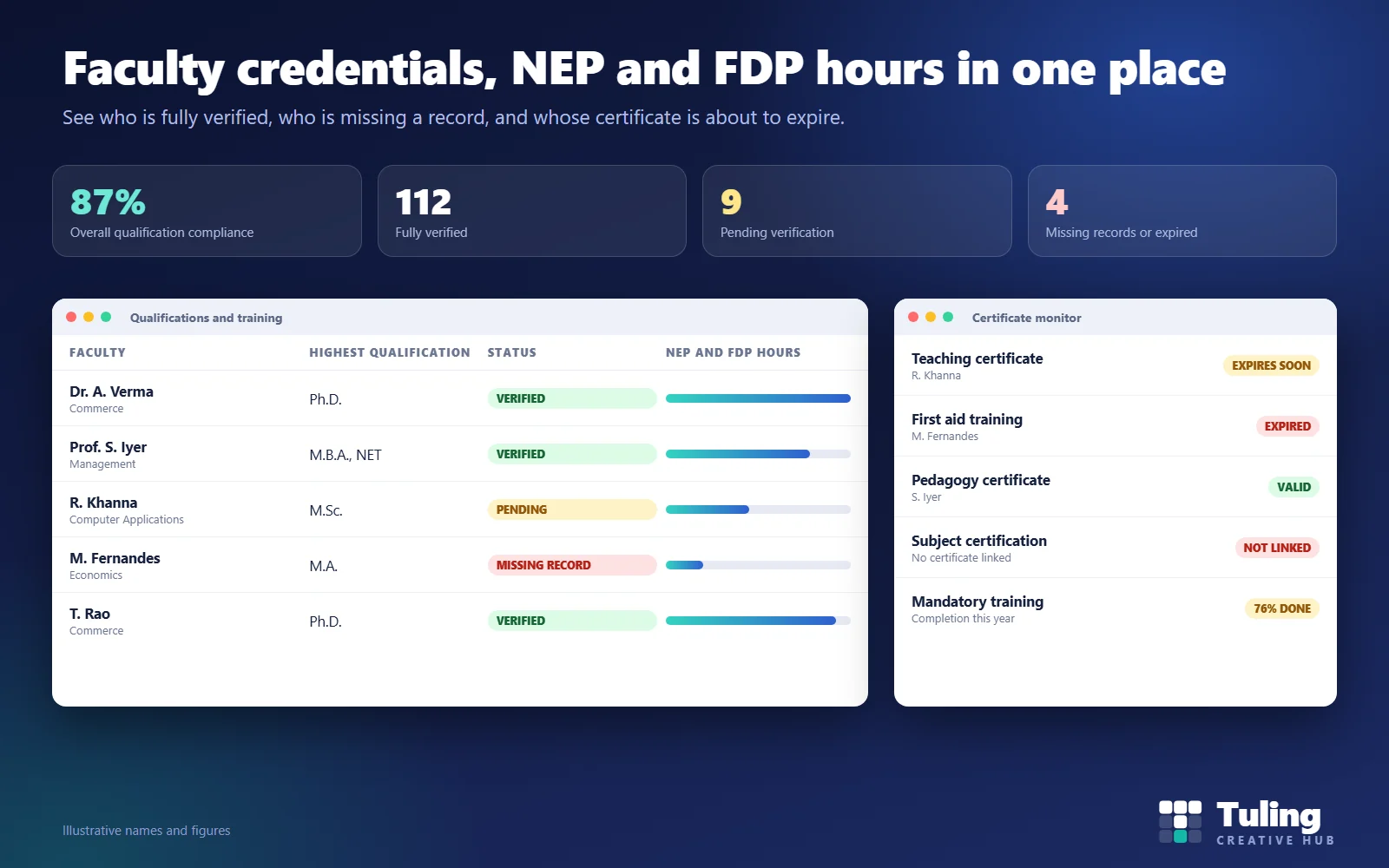
The Qualifications and training screen reads faculty credentials and verification state from personnel records. It presents:
- Overall qualification compliance, so the head of HR or the principal gets one headline figure.
- Status groups: fully verified, pending verification, missing records, and invalid or expired.
- Highest qualification for each faculty member, and a filter by department.
- NEP and FDP hours compared with the compliance threshold, so you can see who is short.
- Mandatory training completion, as a share of people who have completed what is required.
- A certificate monitor that shows certificates with their expiry information, and flags where no certificate is linked.
Training itself is recorded per employee, so each person’s history is kept, and a training impact analysis report is available under HR reports.
Setting the threshold
The threshold for NEP and FDP hours is not something software should invent. It comes from your regulator, your affiliating university, or your own policy. Ask your authority for the current requirement in writing, and have HR enter it. When the requirement changes, update it once and the comparison follows.
Do not copy a number from a blog or a competitor’s brochure. Requirements change, and colleges under different authorities can have different ones.
Making it a monthly routine
- Week 1: records. Look at the missing-records list. Chase each person for the document.
- Week 2: verification. Work through the pending-verification list. Someone other than the faculty member checks the original and marks it verified.
- Week 3: certificates. Look at expiring and expired certificates. Ask the person to renew, or arrange training.
- Week 4: hours. Look at who is short on NEP and FDP hours and which programmes are coming up. Book people into training.
The point is to shorten the list steadily, instead of building it in a panic.
Scenarios
These are illustrative scenarios, not client cases.
Scenario 1: the week before an inspection
The principal asks for a faculty compliance summary. Because records are verified monthly, HR opens the overview, pulls up the list and finds four missing records. The college spends the week fixing four gaps instead of building a list from scratch.
Scenario 2: a certificate quietly expires
A lab safety certificate lapsed three months ago and nobody noticed. With a monitor, it appears as “expires soon” a month before, and the department arranges renewal in time.
Scenario 3: new joiners
Six new faculty join in July. Their qualification records are added when they join, and the overview shows them as “pending verification” until HR checks the originals. Nobody teaches for a semester without a verified record.
Scenario 4: the end-of-year hours shortfall
In February, HR sees that a third of the Commerce department is below the training threshold. The head of department arranges a development week, and hours are recorded as sessions are completed.
Scenario 5: preparing for accreditation
The college is preparing its accreditation report. Faculty data is already organised by department, so the team spends its time on the narrative and not on collecting numbers. Tuling’s NAAC Self-Study Report workspace, an enterprise module, is available for preparing the report, evidence and approvals.
Mistakes to avoid
- Storing scans in a shared drive with no status. A file is not a verified record.
- Verifying once and never again. Certificates expire.
- One person who “knows where everything is”. Put it in the system.
- Using an outdated threshold. Update it when your authority does.
- Treating compliance as an HR-only task. Heads of department should see their own list.
How Tuling approaches it
The qualifications and training screen is part of Tuling HCM, alongside personnel records, performance reviews and POSH, DPDP and regulatory compliance. Pricing is by quote; see how pricing works.
Data protection note
Qualification documents and training records are personal data. Limit access to HR and the person’s own head of department, and keep documents only as long as you need them. See DPDP governance and roles for schools and colleges.
How this guide was made
The screen and statuses described here were checked against the working Tuling HR module. The names, counts and scenarios are illustrative, and no regulatory threshold is stated: confirm yours with your authority. This guide was drafted with AI assistance and reviewed by the Tuling team.
Frequently asked questions
What should a college track for each faculty member?
Highest qualification with its verification status, any mandatory training and its completion, NEP and pedagogical training hours against the compliance threshold, and certificates with their expiry dates.
What do the status values mean?
In Tuling HR a faculty record can be fully verified, pending verification, missing a record, or invalid or expired. The overview shows overall qualification compliance and the counts in each group.
Who sets the NEP and FDP hours threshold?
Your regulator, affiliating university or the college's own policy. HR enters the threshold, and the system compares each person's recorded hours against it. Check the current requirement with your authority.
Can this help with NAAC preparation?
Faculty records are a standard part of accreditation evidence. Tuling also has a NAAC Self-Study Report workspace, which is an enterprise compliance module, for preparing the report, evidence and approvals.
How do certificate expiries get noticed?
A certificate monitor lists certificates with expiry information and shows where no certificate is linked, so HR can act before a certificate lapses.
See faculty compliance on your own records
Share a sample of your faculty list. We load it and show the verification status, the training hours view and the certificate monitor.
Book a demo- Faculty
- Training compliance
- NAAC
- College HR