Faculty leave looks simple until you try to run it. A lecturer asks for two days of casual leave in the week of practical exams. A HOD approves it by phone. A clerk updates the register the next week. At the end of the year nobody can explain why one person has eleven days of earned leave left and another, who joined the same month, has seven.
A faculty leave management system, and a staff leave management system for everyone else on campus, exists to remove that kind of argument. This guide explains what to look for, how leave rules work in a college, and how it is handled in the Tuling HR module. If you are choosing HR software more broadly, start with HR and payroll software for colleges in India, by staff size.
Why college leave is harder than office leave
- The academic calendar sets the limits. Leave in the middle of exams or practicals disrupts students, so colleges need blackout dates, not just approval.
- Different staff groups, different rules. Teaching faculty, administrative staff and support staff rarely share one set of leave types. See staff attendance system for colleges.
- Vacations are structured. Many colleges have vacation periods, and staff must be spread across them so the campus is never empty.
- Extra duty creates credit. Work on a holiday can earn leave. See staff leave management and extra duty credit.
- Approval runs through the HOD. See faculty leave approvals and the HOD desk.
What a faculty leave management system policy should define
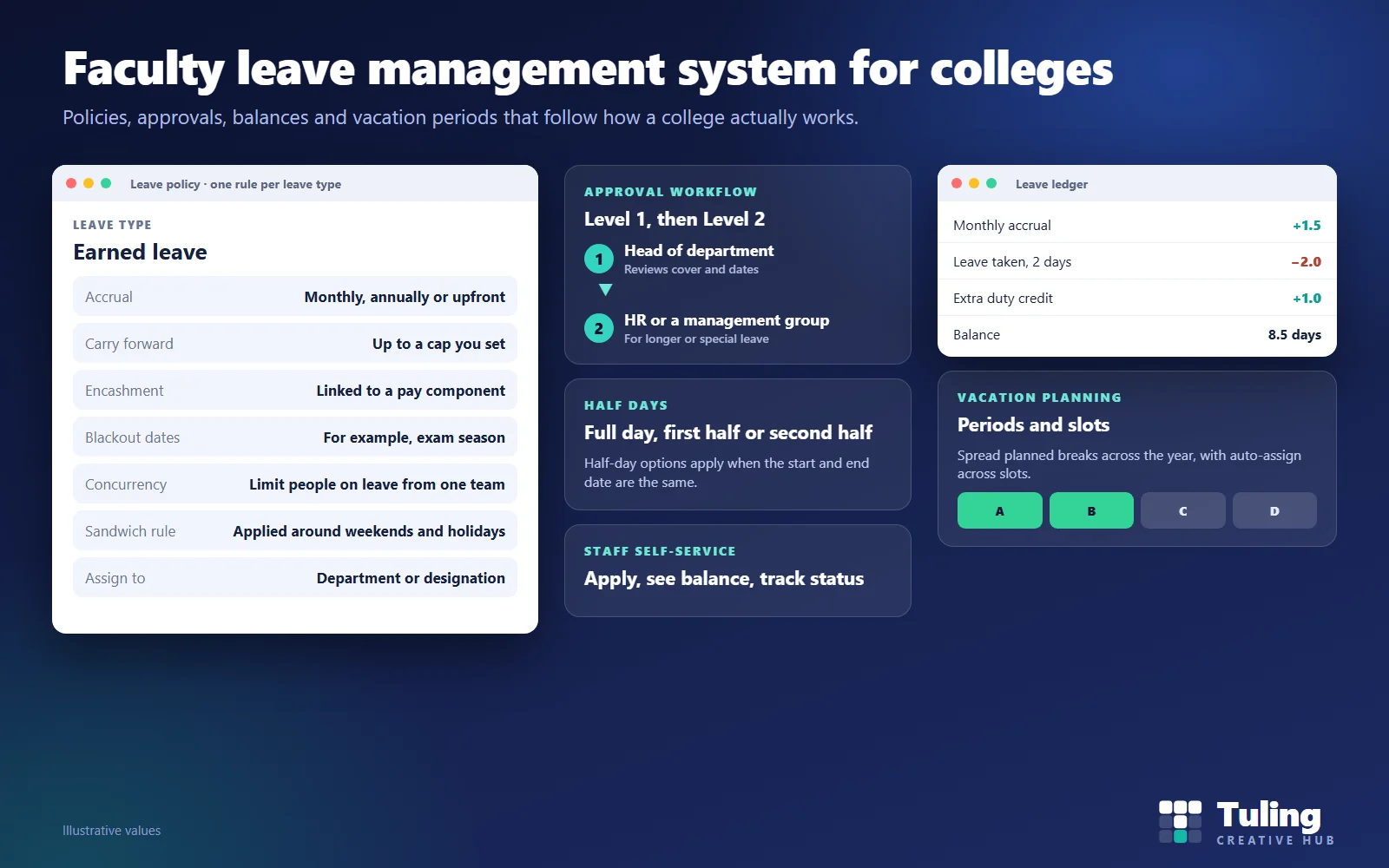
In the Tuling HR module a leave policy is configured per leave type, and a policy allows one rule per leave type. For each, you can set:
| Setting | What it controls |
|---|---|
| Accrual | Monthly, annually, upfront or none, each with its own schedule |
| Annual allowed days or admin-set quota | How much a person can have |
| Carry forward | A cap on how much rolls over, and whether it does at all |
| Encashment | Whether unused leave can be paid out, tied to a pay component so it appears as a payroll line |
| Application allowed from | How many months after joining a person can apply, for leave types that are not available straight away |
| Blackout dates | Periods when leave is blocked, such as exam season |
| Concurrency limit | The most people from the same team who can be on leave together |
| Sandwich rule | How weekends and holidays between leave days are treated |
| Assignment | By department or designation |
A leave policy should not be one document applied to everyone. A lecturer, a hostel warden and an accountant legitimately have different rules.
Approvals
Leave goes through a Level 1 and Level 2 chain. Level 1 is commonly the head of department. Level 2 may be HR, or a management group when a decision needs more than one signature. A policy cannot be published until at least one approval step with a named approver is set up, so a policy cannot go live with nobody to approve it. A policy can also be set to auto-approve after Level 1.
HR sees approvals with an approval trail, can filter by status and can export the filtered list. For the HOD’s side of this, read faculty leave approvals and the HOD desk.
Applying for leave
Staff apply through self-service. They choose the leave type, the dates, and whether it is a full day, first half or second half; half-day options apply when the start and end date are the same. The form shows how the days will be used against the balance, and asks for a reason. A leave correction is available for fixing an earlier entry.
The ledger and balances
Every credit and debit, whether monthly accrual, leave taken, a correction or extra duty credit, is recorded in a ledger. Balances are the result of that ledger, not a number someone typed.
HR can view campus-wide balances by leave type and period. A reconciliation screen lets HR pick an employee and a month, compare their balance with the ledger and see any issues. Do this before year end and before payroll, when leave affects pay.
Vacation planning
For colleges with vacation periods, HR defines periods and slots, and staff apply for a slot. There is an auto-assign that distributes people across slots respecting a capacity rule and department distribution, so a department is never emptied. Bulk assign is available too.
Scenarios
These are illustrative scenarios, not client cases.
Scenario 1: leave in exam week
A lecturer applies for casual leave during practical exams. Because the college set blackout dates for exam weeks, the request is blocked, and the lecturer is asked to choose another date. The HOD does not need to refuse and explain.
Scenario 2: a new joiner asks for earned leave
A person who joined three months ago applies for earned leave. The policy says earned leave is available only from a set number of months after joining, so the apply button is locked. The rule applies to everyone equally.
Scenario 3: a department with too many people away
Four of the six staff in one department apply for the same week. The concurrency limit caps how many can be away together, and the rest are asked to choose other weeks.
Scenario 4: year-end balances do not match
At year end a staff member says their balance is wrong. HR opens reconciliation, picks the employee and compares the balance with the ledger. The trail shows the accrual, the leave taken and a correction, so the figure is explained in minutes.
Scenario 5: summer vacation
HR creates vacation periods and slots, and staff request slots. Auto-assign fills any gaps while respecting department distribution, so every department keeps cover.
Questions to ask any vendor
- Can each leave type have its own accrual and carry-forward rules?
- Can I block leave in exam weeks and cap people away at once?
- Who approves, in what order, and can I name a delegate?
- Where is the ledger, and can I reconcile a balance with it?
- How are half days, corrections and encashment handled?
- How does vacation planning work?
- How does leave link to payroll?
How Tuling approaches it
Leave is part of Tuling HCM: see leave management, with attendance and biometric sync, extra duty leave conversion and the payroll suite. Pricing is by quote; see how pricing works.
Data protection note
Leave records can reveal health and family details. Limit who can see leave reasons, and keep records only as long as you need them. See DPDP governance and roles for schools and colleges.
How this guide was made
The leave policy settings, approvals, ledger, reconciliation and vacation features described here were checked against the working Tuling HR module and its leave module page. Names, numbers and scenarios are illustrative. This guide was drafted with AI assistance and reviewed by the Tuling team.
Frequently asked questions
What should a faculty leave management system include?
Leave policies by leave type with accrual and carry-forward rules, an approval chain, staff self-service, balances with a ledger behind them, half-day options, blackout dates, limits on simultaneous leave, vacation planning and reconciliation.
Can each leave type have its own rules?
Yes. In Tuling HCM each leave type has its own accrual frequency (monthly, annually, upfront or none), carry-forward cap and encashment setting. A policy allows one rule per leave type and can be assigned by department or designation.
How does approval work?
A Level 1 and Level 2 chain, such as the head of department and then HR, or a management group for cases needing more than one sign-off. A policy needs at least one approval step with a named approver before it can be published.
Can leave be blocked during exams?
Yes, through blackout dates, and you can also cap how many people from the same team can be on leave at once.
How do I check that balances are right?
A reconciliation screen lets HR pick an employee and a period and compare the balance with the ledger, listing any issues.
See leave policies, approvals and balances on screen
Bring your current leave rules. We set up a sample policy, run a request through approval and show the ledger and reconciliation.
Book a demo- Leave management
- Faculty
- College HR
- Staff leave management system