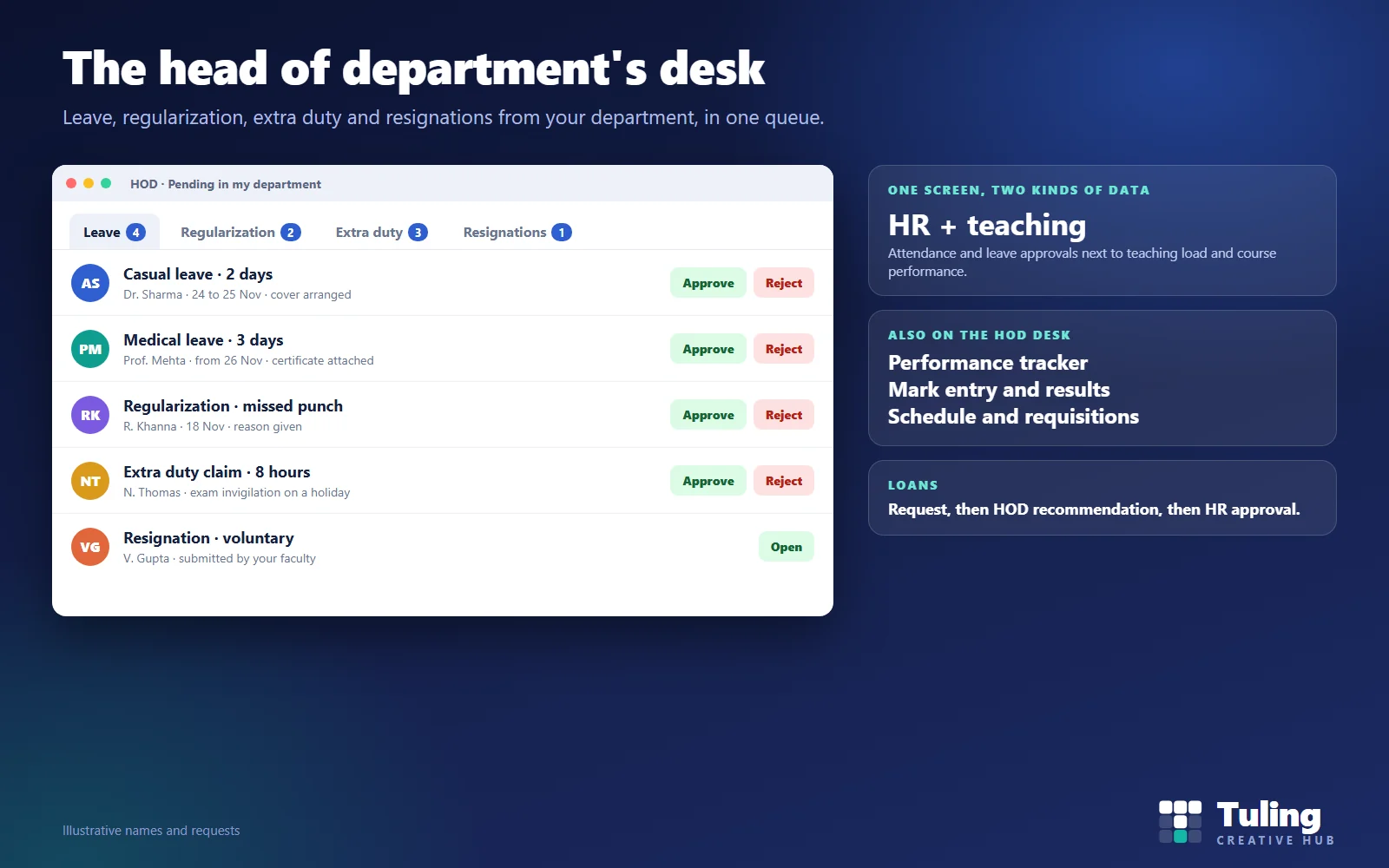
Ask a faculty member what slows down HR in their college and the answer is often not HR. It is the approval that sits unread on a head of department’s screen for a week. Leave, regularization of a missed punch, an extra duty claim: all wait for the HOD before they can reach HR and payroll.
This guide describes how faculty leave approvals and other requests should reach the head of department, what they should see and approve, how to keep the queue moving, and how this works in the Tuling HR module. It builds on HR and payroll software for colleges by size and staff group.
Why the HOD matters so much in a college
In a company, the first approver is a line manager. In a college, it is the head of department, who also teaches, runs timetables, supervises exams and handles student matters. The HOD’s time is scarce, and requests arrive in bursts: before holidays, during exams, at month-end.
If the software scatters those requests across different screens, approvals slow down. If it brings them together, they get done between classes.
Faculty leave approvals and what belongs on the HOD’s desk
In Tuling HCM, the HOD desk covers:
| Area | What the HOD does |
|---|---|
| Leave approvals | Approve or reject leave from their department |
| Regularization | Approve corrections of missed punches and attendance |
| Extra duty | Review claims for extra hours before they count |
| Team resignations | See voluntary resignations submitted by their faculty |
| Performance tracker | Complete structured reviews for the team |
| Attendance | See who is in and who is absent |
| Mark entry, results, schedule | Academic tasks alongside HR ones |
| Requisitions | Raise inventory requisitions for the department |
| Loans | Recommend a staff loan before HR approves it |
The product describes this as one screen with entitlement-aware data blending: HR data such as attendance and leave approvals together with academic data such as teaching load and course performance, for the modules your college is licensed for.
The queue: how to keep it moving
A queue is only useful if it is read. A few habits help:
- Check it at fixed times. For example, after the first class and at the end of the day.
- Approve with a reason when rejecting. A rejected leave with no reason produces a second request and an angry email.
- Look for cover first. Before approving leave, check that classes are covered.
- Approve extra duty against the duty roster. Ask whether the work actually happened.
- Name a delegate. When the HOD is away, someone else must approve. Tuling’s workflow modules include approver delegation and SLA escalation, so requests do not stall; check which of them your plan includes.
Performance reviews on the HOD desk
A review is where a HOD’s judgement matters most, and where free-form emails fail. The performance tracker presents a structured form:
- manager review criteria, each with a reviewer score
- areas for improvement
- development recommendations
- a final assessment summary
Comments must reach a minimum length, so a review cannot be a single word. The result sits in the employee’s record and can inform increments and promotions. See promotions and increment cycles in a college.
Scenarios
These are illustrative scenarios, not client cases.
Scenario 1: exam week
In exam week a HOD with 40 faculty receives leave requests, regularizations and extra duty claims for invigilation, all at once. With one queue sorted by type, the HOD clears extra duty claims against the invigilation roster in ten minutes and moves on to leave.
Scenario 2: leave with no cover
A faculty member requests leave on a day with a practical exam. The HOD sees the request and the cover note, rejects it with the reason, and suggests another date. The faculty member resubmits instead of arguing.
Scenario 3: a resignation arrives mid-semester
A faculty member submits a voluntary resignation. The HOD sees it on the team resignations screen, speaks to the person and plans cover for their classes. The next steps, clearance and settlement, are in faculty resignation, clearance and full and final settlement.
Scenario 4: the HOD is on leave
The HOD goes on a week of leave during the busiest period. A delegate is named, and requests are routed to them. Without a delegate, a week of leave means a week of frozen approvals.
Scenario 5: loan recommendation
A staff member applies for a loan. The request goes to the HOD for a recommendation, then to HR for approval. Disbursement posts to the accounts and the instalments come out through payroll.
What HR can do to help HODs
- Give HODs a short guide to the queue and the review form.
- Show each HOD their own pending count regularly.
- Agree on a service level, for example “within two working days”.
- Review stuck approvals monthly and ask why.
How Tuling approaches it
The HOD desk is part of Tuling HCM, alongside leave management, attendance and biometric sync and performance reviews. Pricing is by quote; see how pricing works.
Related: for leave policies in depth, see faculty leave management system for colleges.
Data protection note
A HOD sees personal information about their team: leave reasons, health-related leave and performance notes. Limit what is visible to what the role needs, and keep review comments factual. See DPDP governance and roles for schools and colleges.
How this guide was made
The screens and approval roles described here were checked against the working Tuling HR module. The names, numbers and scenarios are illustrative. This guide was drafted with AI assistance and reviewed by the Tuling team.
Frequently asked questions
What should a head of department be able to approve?
Leave requests, attendance regularization and extra duty claims from their department, and see resignations submitted by their faculty. They also recommend loans before HR approves them, and complete performance reviews for their team.
Why does the HOD's approval speed matter?
Because the HOD is usually the first approver, an unread queue delays leave decisions, regularization and extra duty credit, and so payroll corrections. Many HR complaints are really approval delays.
Can the HOD see teaching and HR data together?
In Tuling HCM the faculty and HOD dashboards combine HR data, such as attendance and leave approvals, with academic data, such as teaching load and course performance, on one screen, for the modules your college is licensed for.
What happens when the HOD is on leave?
A college should name a delegate. Tuling's workflow modules include approver delegation and escalation, so requests are not stuck. Confirm which workflow modules are in your plan.
How are performance reviews recorded?
As a structured review with criteria, a score for each, areas for improvement, development recommendations and a final assessment summary. Comments need a minimum length, so reviews cannot be left blank.
See the HOD desk with your own departments
We set up a sample department and walk through the queue: a leave request, a regularization, an extra duty claim and a performance review.
Book a demo- HOD
- Leave approvals
- College HR
- Faculty