Increment season in a college tends to follow a pattern. A spreadsheet appears with names and percentages. Someone in finance asks what it will cost. A senior member of staff points out three people who were left off. A fourth finds out about their increment from a colleague. Letters are prepared by hand, a week late.
None of this is anyone’s fault. It is what happens when a yearly project is run on tools made for something else. This guide describes a cleaner way to run increments and promotions, and how this works in the Tuling HR module. It follows on from the HOD’s desk, where the performance reviews that inform these decisions are completed.
Increments and promotions are different things
- An increment raises pay within the same role, usually yearly.
- A promotion moves a person to a higher role or grade, and may change pay at the same time.
They are often decided together but follow different rules. Increments are mostly about money and fairness across a group. Promotions are mostly about eligibility.
The five steps of an increment cycle
1. Create a cycle
A cycle bundles an increment round: who is in it, and when it takes effect. In Tuling HCM you create a cycle to bulk-revise salaries for the staff you choose, so the revision is one controlled project and not hundreds of separate edits.
2. Set the increment
The default can be a percentage or a flat amount per month. A flat amount suits groups where a percentage would give very different outcomes, for example support staff on lower pay. A percentage suits grade-based scales.
3. Add overrides
Not everyone should get the default. Import per-employee overrides for the cycle: higher for an exceptional performer, lower or none for someone on a performance plan. The override is visible against the default, so the exception is explicit.
4. Check the cost and approve
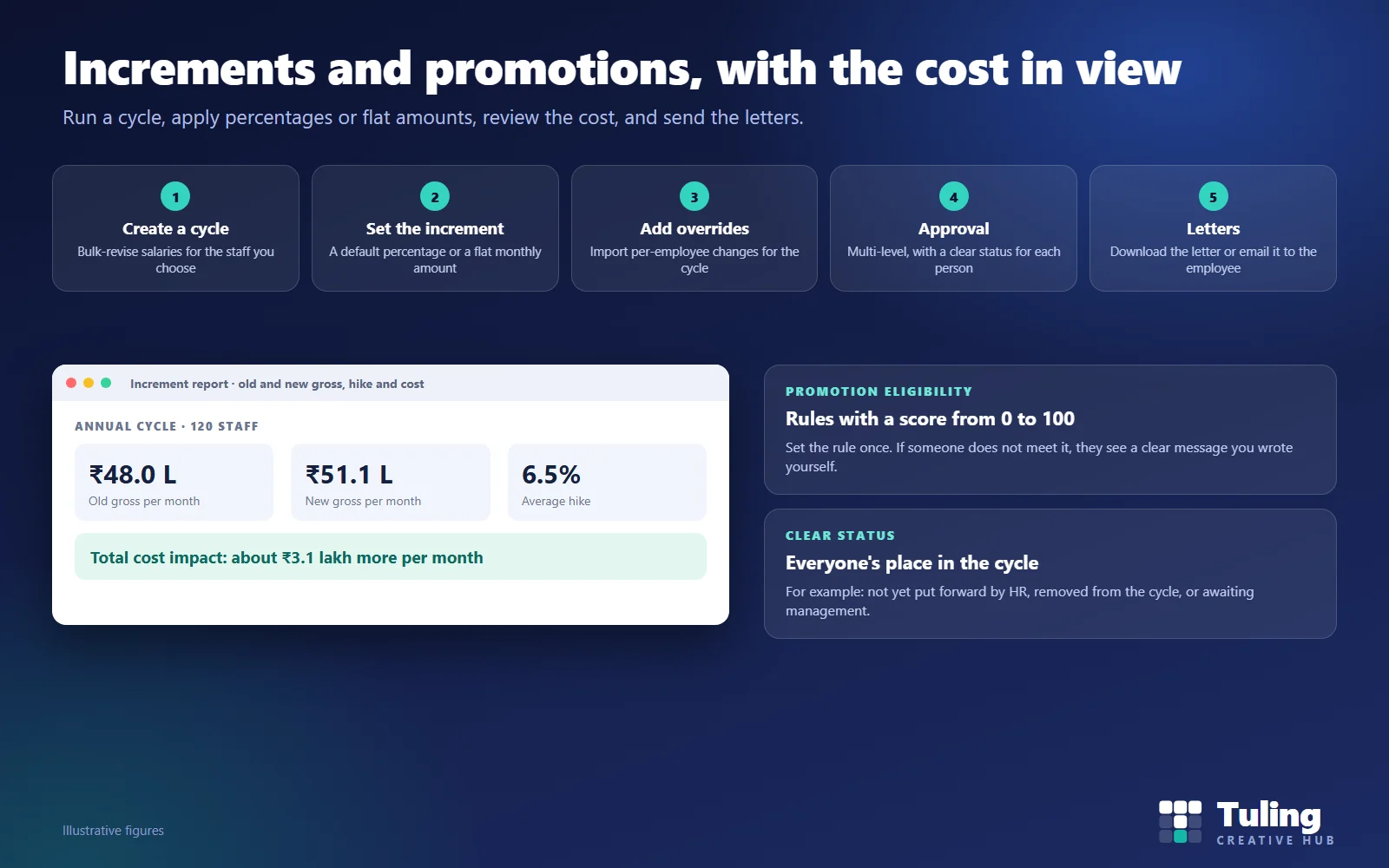
Before approval, open the increment report. It shows old gross, new gross, the hike percentage and the total cost impact. Management can see what the cycle will cost each month before saying yes. Approval is multi-level, so more than one person signs off before it takes effect.
5. Send the letters
The letter for each employee can be downloaded or emailed to them directly. Employees hear the news from the college, not from a colleague.
A worked example
Illustrative numbers, not client data.
A college has 120 staff in the cycle. Old gross pay across the group is ₹48.0 lakh a month. With a default percentage and a few overrides, the average hike comes to 6.5%, and new gross is ₹51.1 lakh a month. The cycle will cost about ₹3.1 lakh more every month.
That single line, “about ₹3.1 lakh more per month”, is what the principal and the finance head need before they sign. Without it, they are approving blind.
Promotion rules
Promotion decisions are fairer when they are written down. In Tuling HCM you can:
- Define a promotion pathway, the route from one role to the next.
- Add eligibility rules, each with a score from 0 to 100.
- Write a custom message shown when someone does not meet a rule, such as “Requires the next qualification level”.
The message does a lot of work. “Not eligible” starts an argument. “Requires two years in the current grade” starts a plan.
Tie decisions to evidence: review scores, qualifications, tenure. See faculty qualifications, NEP and FDP hours for the qualification side.
Knowing where everyone stands
A cycle should make each person’s status clear, for example:
- HR has not put the employee forward yet
- HR removed the employee from the cycle
- Awaiting management
Clear statuses reduce the number of “where is mine?” questions, and they make it easy for HR to chase the few that are stuck.
Scenarios
These are illustrative scenarios, not client cases.
Scenario 1: the annual cycle
HR creates the cycle in March, applies a default percentage to the teaching staff and a flat monthly amount to the support staff, imports twelve overrides, checks the cost report, and sends it to management. After approval, letters go out the same week.
Scenario 2: an employee left off
An employee notices they are not in the cycle. HR checks the status: “not yet put forward”. HR adds them, and the cycle reflects it. The error is caught before approval, not after.
Scenario 3: the cost is higher than the budget
The cost report shows a monthly impact above what finance had budgeted. Management reduces the default percentage and re-runs the report before approving. The decision is made on numbers.
Scenario 4: a promotion that is not yet due
A lecturer is proposed for promotion but does not meet the eligibility rule. The system shows the message the college wrote. The lecturer and HOD agree a plan to meet the requirement and review it next year.
Scenario 5: a late joiner
Someone who joined in January is in a March cycle. HR decides whether to include them, and records the decision. A written rule for new joiners avoids debate each year.
Mistakes to avoid
- Deciding the percentage before looking at the cost. Look at the report first.
- Overrides without reasons. Keep a note for each.
- Unwritten promotion criteria. If it is not written, it will be disputed.
- Late letters. Staff should hear on the day of approval.
- No audit trail. You should be able to say who approved what and when.
How Tuling approaches it
Increments and promotions are part of Tuling HCM: compensation and increments and performance reviews, with payroll in the payroll suite. Pricing is by quote; see how pricing works.
Data protection note
Salary and performance data are sensitive. Restrict access to those who need it, and keep a record of approvals. See DPDP governance and roles for schools and colleges.
How this guide was made
The cycle steps, report and eligibility features described here were checked against the working Tuling HR module. The salary figures, staff counts and scenarios are illustrative, not client data. This guide was drafted with AI assistance and reviewed by the Tuling team.
Frequently asked questions
How does an increment cycle work in Tuling HCM?
You create a cycle to bulk-revise salaries, set a default increment percentage or a flat monthly amount, add per-employee overrides by import, send it through multi-level approval, and then download or email the letters.
Can some staff get a flat amount and others a percentage?
Yes. A cycle can use a default percentage and a flat amount for suitable groups, and individual overrides can be imported for the cycle.
How can we see the cost before approving?
The increment report shows old and new gross, the hike percentage and the total cost impact, so management can approve with the cost in view.
What are promotion eligibility rules?
Rules that define who qualifies for a promotion pathway, with a score from 0 to 100 and an optional message shown when someone does not meet the rule.
Do employees know where they are in the cycle?
Statuses such as not yet put forward by HR, removed from the cycle by HR, or awaiting management make each person's position visible.
See an increment cycle with the cost report
Bring last year's increment rules. We set up a sample cycle, apply overrides and show the cost report and a letter.
Book a demo- Increments
- Promotions
- Compensation
- College HR