Two principals ask the same question: “Which HR software should we use?” One runs a college with about 150 staff on a single campus. The other leads a group with several campuses and well over a thousand staff. They need different things, and the difference is not just a number.
This guide is for both, and for colleges in between. It explains what to look for in college payroll software and HR software, what actually changes with size, describes the staff groups every college has to handle, works through scenarios you can match against your own, and suggests an order in which to switch modules on. If you want to understand why a generic corporate tool struggles in a college, read HRMS for colleges: why a corporate HR tool falls short first. If your main concern is month-end pay, read payroll, attendance and leave for college staff.
HR and payroll software for colleges in India: the short answer
| Your college | What hurts most | Start with | Add next | Later |
|---|---|---|---|---|
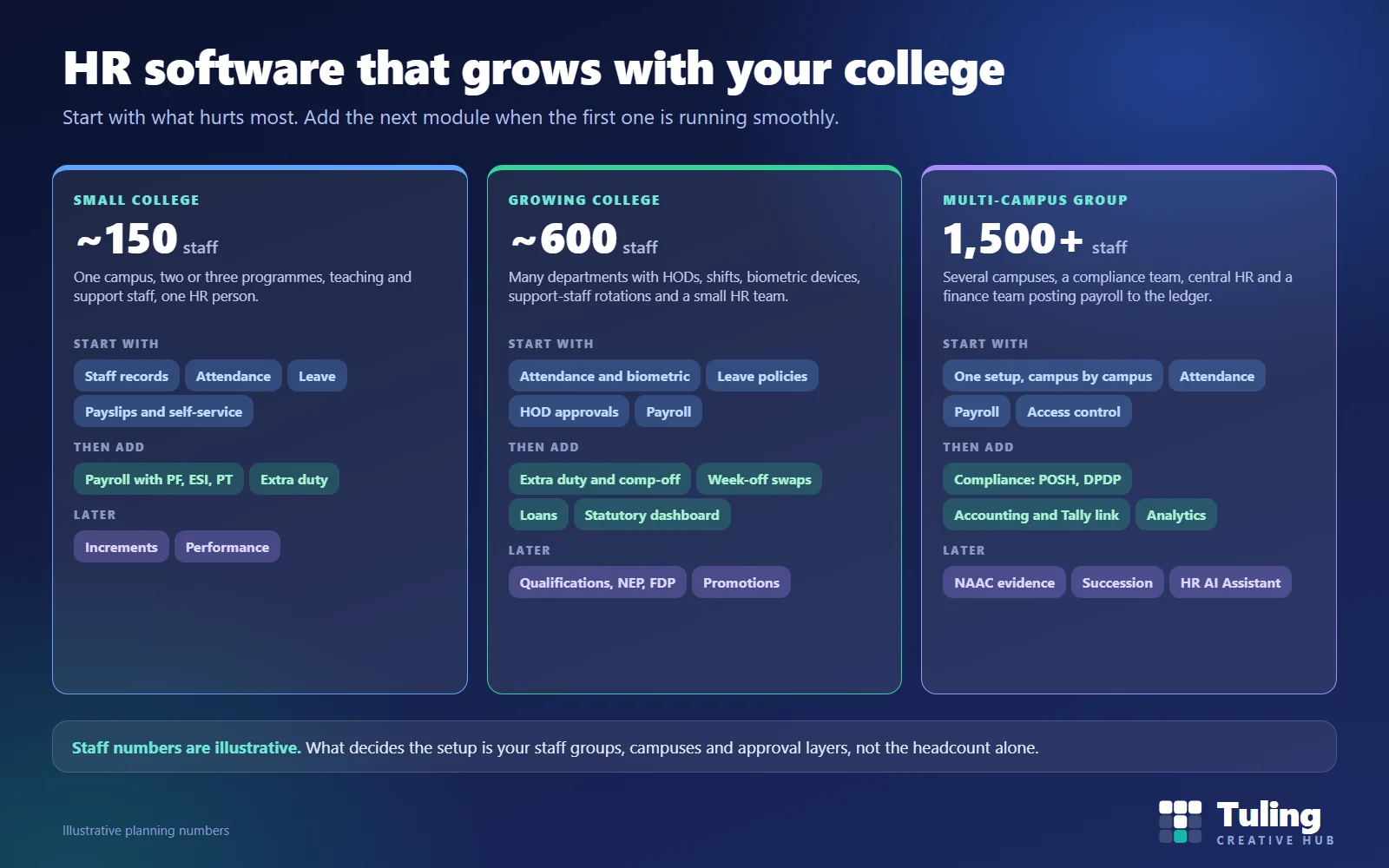
| About 150 staff, one campus | Leave and payslip requests landing on one person | Staff records, attendance, leave, self-service | Payroll with PF, ESI, PT; extra duty | Increments, performance |
| About 600 staff, many departments | Approvals, shifts, biometric data, support-staff rotations | Attendance and biometric, leave policies, HOD approvals, payroll | Extra duty and comp-off, week-off swaps, loans, statutory tracking | Qualifications, NEP and FDP, promotions |
| 1,500+ staff, several campuses | Consistency, compliance, posting pay to the accounts | One setup by campus, attendance, payroll, access control | POSH and DPDP records, accounting and Tally link, analytics | NAAC evidence, succession, AI assistant |
Why headcount alone is the wrong question
Two colleges with 300 staff can need very different software. What matters:
- Staff groups. A college has teaching staff, HODs and administrators, support staff such as security, housekeeping, hostel and transport, office staff and sometimes visiting faculty. Each group has different attendance and leave rules.
- Attendance sources. Biometric devices, manual registers, timetable-driven schedules and shift rotations all behave differently.
- Approval layers. In a college, leave is often approved by the HOD first and then HR, and sometimes by the principal. More layers mean more need for a clear workflow.
- Campuses. Each campus may have its own HR contact, holidays and access rules.
- HR team size. One person doing HR, payroll and accounts needs self-service and automation more than a team of five.
- Statutory load. PF, ESI, professional tax and TDS can apply differently across staff groups, and the deductions have to be calculated and paid on a regular schedule.
The staff groups every college has
| Group | How attendance usually works | What the software needs to handle |
|---|---|---|
| Teaching faculty | Follows the timetable, biometric or self-marked | Leave policies, vacation periods, HOD approval, teaching load |
| HODs and administrators | Office hours or flexible | They approve for others and have their own leave |
| Support staff | Shifts and rotations, week-off swaps, manual attendance in places | Shift definitions, swaps, manual entry by HR, extra duty |
| Office and accounts staff | Fixed hours, biometric | Standard attendance and leave |
| Visiting faculty | Paid by the lecture, not by the month | A different pay basis; ask any vendor to show how it works |
A tool that only knows “employees with 9-to-5 shifts” forces you to fit the second and third rows into workarounds. In Tuling HCM, academic roles such as Principal, Vice Principal, Dean, HOD, Registrar, Controller of Examinations and Librarian are real position types, and support staff have their own attendance page and week-off swaps.
Scenario 1: a college of about 150 staff on one campus
Illustrative planning numbers, not client data.
A college has around 150 staff: about 80 teaching, 20 administrative and 50 support staff. One HR officer also helps with accounts.
What goes wrong. Leave is on paper and WhatsApp. Attendance is a register with a monthly total. Payslips are printed and distributed. The HR officer spends the last week of every month counting leave days.
What to choose. Start with the basics: staff records, attendance, leave and self-service. Staff apply for leave and see payslips themselves, which cuts requests to the HR office. Then add payroll, with PF, ESI and professional tax exports, and extra duty so weekend work stops being forgotten.
What to leave for later. Increments, performance reviews and succession planning. They matter, but they should wait until the daily work is under control.
Scenario 2: a college of about 600 staff
Illustrative planning numbers, not client data.
A growing college has many departments, each with a HOD. There are biometric devices at several gates, a large support staff on rotating shifts and an HR team of three.
What goes wrong. Leave approvals pile up with HODs. Biometric logs and the register disagree. Support staff swap week-offs informally and the payroll team finds out afterwards. Extra duty is promised but not tracked.
What to choose. Start with attendance and biometric sync, leave policies and HOD approvals, and payroll. Then extra duty and comp-off, week-off swaps, loans and a statutory dashboard. Extra duty is described in extra duty and leave credit in a college.
What to watch. Approval speed. A HOD who has not seen five pending requests for a week is a more common problem than a missing feature.
Scenario 3: a multi-campus group with 1,500 or more staff
Illustrative planning numbers, not client data.
A group runs several campuses with its own HR contact at each, and a central HR and finance team.
What goes wrong. Each campus follows its own leave practice. Reports are assembled in spreadsheets. Compliance records for POSH and data protection are scattered. Payroll is journalled into the accounts by hand.
What to choose. One setup covering every campus, with access limited to the campus a person is responsible for. Payroll first, then compliance records and the link to accounting and Tally, and analytics for the group. Ask how reports are cut by campus and by department. Pricing for groups is quoted individually.
Scenario 4: a large support-staff workforce
Illustrative planning numbers, not client data.
A college with a hostel, transport and a large campus employs more support staff than teaching staff. They work shifts, rotate weekly off days and are often marked manually by supervisors.
What goes wrong. A generic system expects biometric punches and standard weekends. Manual corrections pile up and payroll disputes follow.
What to choose. A system with shift definitions and assignments, a page for support-staff attendance, week-off swaps, regularization with approval, and a way to reverse a late deduction when an approval comes afterwards. Ask the vendor to show these on screen, not describe them.
Scenario 5: the HR officer who is also the accountant
Illustrative scenario.
One person handles HR, payroll and fee accounts.
What to choose. Prioritise self-service and automation. Leave requests, payslips, tax declarations and document uploads should not come through this person. Payroll should be a preview-then-finalize run, not a manual calculation. The ledger link matters: payroll and loan postings should reach the accounts without being re-typed.
A sensible module order
- Month 1: the foundation. Staff records, org structure, roles. Clean data now saves months later.
- Month 2: time and leave. Attendance sources, shifts, leave policies and approvals, self-service.
- Month 3: pay. Pay structures, a payroll preview alongside your current method for a month, then finalize with statutory exports.
- Month 4 and after. Extra duty, loans, increments, performance and compliance modules.
A parallel run of a month or two before you switch payroll is worth it. The same approach is described in how a college moves off Excel.
Eight questions to ask any vendor
- Which of our staff groups does the system handle without workarounds?
- Can I see support-staff shifts, week-off swaps and manual attendance on screen?
- How does extra duty or comp-off work, and in hours or days?
- Who approves leave and in what order, and can I change it?
- Does payroll post to our accounts, and to Tally if we use it?
- How is access limited by campus and by role?
- How do you handle visiting faculty and other staff paid differently?
- What does a one-month parallel run look like?
How Tuling approaches it
Tuling HCM is the HR module of the college ERP. It covers staff records, onboarding and probation, resignation and exit, academic-hierarchy positions, attendance with biometric sync, support-staff attendance, week-off swaps, extra duty conversion, leave management, payroll with PF, ESI, professional tax and TDS, loans, compensation and increments, performance reviews, succession planning, compliance and an HR assistant. Modules can be added over time, so you start where it hurts and grow. Pricing is by quote, based on staff and student numbers, campuses and modules; see how pricing works. For the ERP as a whole, see how to build a college ERP one module at a time.
Related: for leave policies in depth, see faculty leave management system for colleges.
Data protection note
HR systems hold bank details, identity documents, salary and health-related leave. Limit who can see what, keep an audit trail of changes and agree retention periods. See DPDP governance and roles for schools and colleges.
How this guide was made
The module descriptions were checked against the working Tuling HCM module. The staff numbers, college profiles and scenarios are illustrative planning assumptions, not client data and not industry statistics. This guide was drafted with AI assistance and reviewed by the Tuling team.
Frequently asked questions
What HR software should a college with about 150 staff choose?
Start with staff records, attendance, leave and self-service so payslips and leave requests stop going through the HR office. Then add payroll with PF, ESI and professional tax, and extra duty. Add increments and performance later. Choose a system that can grow into those modules without changing vendor.
What about a college with 600 staff?
Expect many departments with HODs who approve leave, biometric devices, shifts, support-staff rotations and a small HR team. Prioritise attendance with biometric sync, leave policies, HOD approvals and payroll, then extra duty, week-off swaps, loans and statutory tracking.
What changes for a multi-campus group?
You need one setup that covers every campus, access that is limited to the right campus, payroll that posts to the accounts, and compliance records such as POSH and DPDP held centrally. Ask how reporting is cut by campus.
Can a corporate HRMS work for a college?
It can handle payroll and basic leave, but colleges have academic roles, HOD approvals, shift and rotation patterns for support staff, extra duty and vacation periods that corporate tools often handle through workarounds. See the related guide on why a corporate HR tool falls short.
How much does HRMS software cost in India for a college?
HRMS prices in India vary by vendor and by what is included. Tuling HCM is priced by quote, based on staff and student numbers, campuses and the modules you choose. The pricing page explains the starting points.
Bring your staff groups and we will map your HR setup
Share your headcount by group, campuses and current leave and attendance rules. We show which Tuling HCM modules you need first, and which can wait.
Book a demo- College HR
- HRMS for colleges
- Buyer's guide
- College payroll