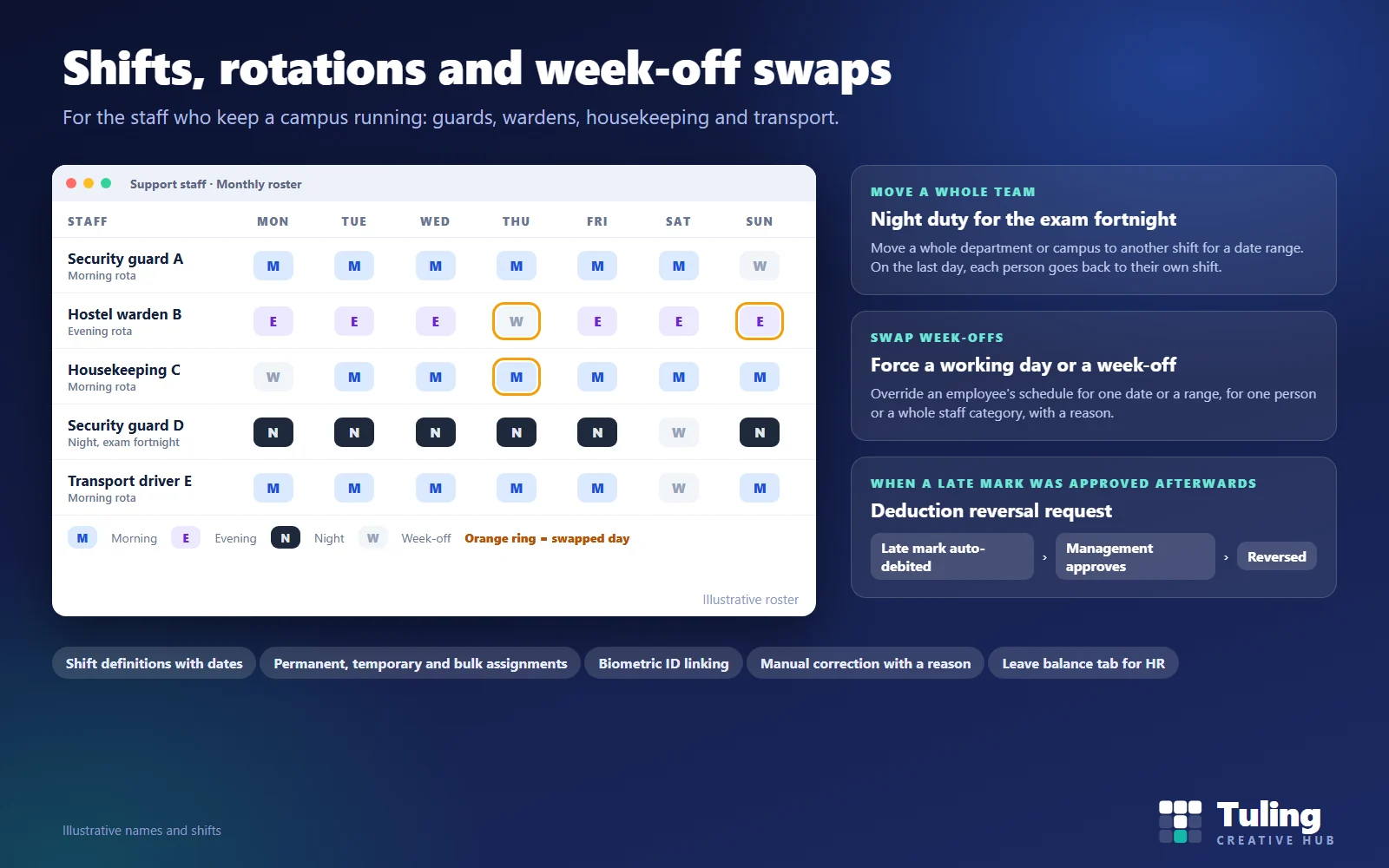
A college runs on people who are not on the timetable. The guard at the main gate, the warden who covers the hostel in the evening, the housekeeping team that starts before the first class and the driver who brings the faculty bus in. They work shifts, they rotate their weekly off, and when exams or an event arrive their duty changes at short notice.
Most staff attendance systems, and most biometric attendance systems for colleges, are built around a person who works the same hours each weekday. For support staff that assumption produces a register that is corrected by hand every month and payroll disputes that nobody enjoys. This guide explains how to handle shifts, rotations and week-off swaps properly, and how this works in the Tuling HR module. For where this fits in the wider HR set-up, see HR and payroll software for colleges by size and staff group.
Why a staff attendance system needs its own rules for support staff
| Faculty and office staff | Support staff |
|---|---|
| Follow the timetable or fixed office hours | Work shifts that can differ by week |
| One fixed weekly off | Rotating or swapped week-offs |
| Punch in and out at a gate | May be marked by a supervisor when a device fails |
| Rarely change hours at short notice | Move to night or holiday duty for exams and events |
If the software treats everyone as nine-to-five, every shift worker looks late or absent, and HR spends the month-end fixing it.
Step 1: define the shifts once
A shift is a named pattern of working hours, for example morning, evening or night. In the Tuling HR module, shifts are created as definitions and assigned to employees with effective date ranges. Because assignments have dates, a change in October does not rewrite September’s attendance.
Step 2: assign shifts in three ways
Assignments appear in one list, whether they are:
- Permanent: the person’s regular shift.
- Temporary: a different shift for a defined period, for example while a colleague is on leave.
- Bulk: many people at once.
A bulk change can move a whole department or campus to another shift for a date range. The useful detail is what happens afterwards: on the last day, each person goes back to their own shift. Nobody has to remember to undo it.
Step 3: link every employee to a biometric ID
Biometric attendance only works if the device’s enrolment number is linked to the employee record. Tuling HR has a screen where HR links employees to their enrolment IDs, and a link can be cleared by leaving the field blank.
The most common cause of “he was here but the system says absent” is a new joiner who was enrolled on the device but never linked. Make the link part of your joining checklist.
Step 4: record week-off swaps, don’t just agree them
A week-off swap overrides an employee’s schedule for a date or a range. It can force a working day or a week-off for specific dates. You can apply it to a single employee or to a whole cohort, such as a staff category, and you can add a reason.
Two design points matter:
- History is kept. You can open an employee and see their swap history for a date range.
- Changes are controlled. After a swap is created, only the remarks can be edited. To change the date or the type, you cancel it and create a new one. That stops a swap being quietly rewritten after the fact.
Step 5: allow manual attendance, but with a reason
Biometric devices fail. A supervisor sometimes needs to mark attendance. The support staff page in Tuling HR offers a monthly roster view and a manual edit that asks for a reason and shows a review screen (“Please review before saving”) before it commits. Recent manual changes are listed for each person, so a correction can be traced later.
The same page shows each person’s leave balances. HR can also add to or reduce a support staff member’s leave balance as a correction, with a reason. The rules are strict: support staff only, a reduction cannot take a balance below zero or below the days held for pending requests, credits stop at the leave type’s quota ceiling, and extra duty credit cannot be typed in by hand. See extra duty and leave credit in a college.
Step 6: reverse a deduction when management approved afterwards
Sometimes a late arrival is auto-deducted, and then management approves it, outside the normal leave or on-duty request. For this, a staff member or HR raises a deduction reversal request: choose the employee, whether it was a full day or half day, and the leave type that was auto-deducted, and add a reason. It goes to an approver, and the requests raised are listed so nothing is lost.
Without this, the choices are to leave an unfair deduction in place or to edit payroll by hand.
Scenarios
These are illustrative scenarios, not client cases.
Scenario 1: night duty for the exam fortnight
The college needs more security at night during semester exams. HR moves the security team to the night shift for the date range. During the fortnight the roster shows night shifts. On the last day the team returns to its normal shift without anyone re-entering a thing.
Scenario 2: two wardens swap a week-off
Two wardens agree to swap their weekly offs for a wedding. Instead of telling the supervisor on WhatsApp, one creates the swap with a reason. Payroll sees a working day where the roster had a week-off, and the other warden’s day is adjusted too.
Scenario 3: a late mark approved afterwards
A guard arrives late during heavy rain, and the system auto-deducts half a day. The principal later says the delay was excusable. HR raises a deduction reversal for half a day. After approval, the deduction is reversed and the record shows why.
Scenario 4: a device is down
The biometric device at the hostel gate fails for two days. The supervisor marks attendance manually and gives the reason “device fault”. The review screen makes them check the entries, and the recent-changes list shows who did what.
Scenario 5: a new joiner who never shows up on the roster
A new housekeeping attendant starts on Monday, but is not linked to a biometric ID. By Friday payroll sees five absences. Linking the ID at joining, and a quick check in the first week, stops this.
Questions to ask any vendor
- Can I see shift definitions, assignments and a bulk move on screen?
- What happens to a person’s shift on the last day of a temporary move?
- How are week-off swaps recorded, and can they be rewritten later?
- How are manual attendance entries controlled and traced?
- How is a deduction reversed when management approves afterwards?
- How is a biometric ID linked, and what happens if it is missing?
How Tuling approaches it
These features are part of Tuling HCM: attendance and biometric sync and week-off swaps and attendance adjustments, with support staff attendance on its own page. Leave and regularization with approvals sit alongside. Pricing is by quote; see how pricing works.
Related: for leave policies in depth, see faculty leave management system for colleges.
Data protection note
Attendance and biometric records are personal data. Limit who can edit them, keep an audit trail of corrections and agree how long records are kept. See DPDP governance and roles for schools and colleges.
How this guide was made
The screens and rules described here were checked against the working Tuling HR module. The roster, names, shifts and scenarios are illustrative. This guide was drafted with AI assistance and reviewed by the Tuling team.
Frequently asked questions
How should a college handle shifts for support staff?
Define each shift once with effective dates, then assign it to people permanently, for a limited period or in bulk. Keep every assignment in one list so HR and supervisors can see who is on which shift on any day.
What is a week-off swap?
It overrides an employee's schedule for a date or a range, forcing a working day or a week-off. In Tuling HCM you can apply it to one person or to a staff category, with a reason, and the history is kept.
Can we move a whole department to another shift for a short time?
Yes. Move a department or campus to another shift for a date range, for example night duty during examinations. On the last day each person goes back to their own shift.
What if a late mark was deducted and later approved?
Raise a deduction reversal request for a full or half day and choose the leave type that was auto-deducted. It goes to an approver. This is for a case where management approved the lateness outside the normal leave or on-duty flow.
Can HR correct support staff attendance by hand?
Yes, through a manual edit that asks for a reason and shows a review screen before saving. Recent manual changes are listed so the correction can be traced.
See support staff shifts and swaps on screen
Bring your current rota. We set up shifts, a week-off swap and a deduction reversal so you can see how each one is recorded.
Book a demo- Attendance
- Support staff
- Shifts
- College HR