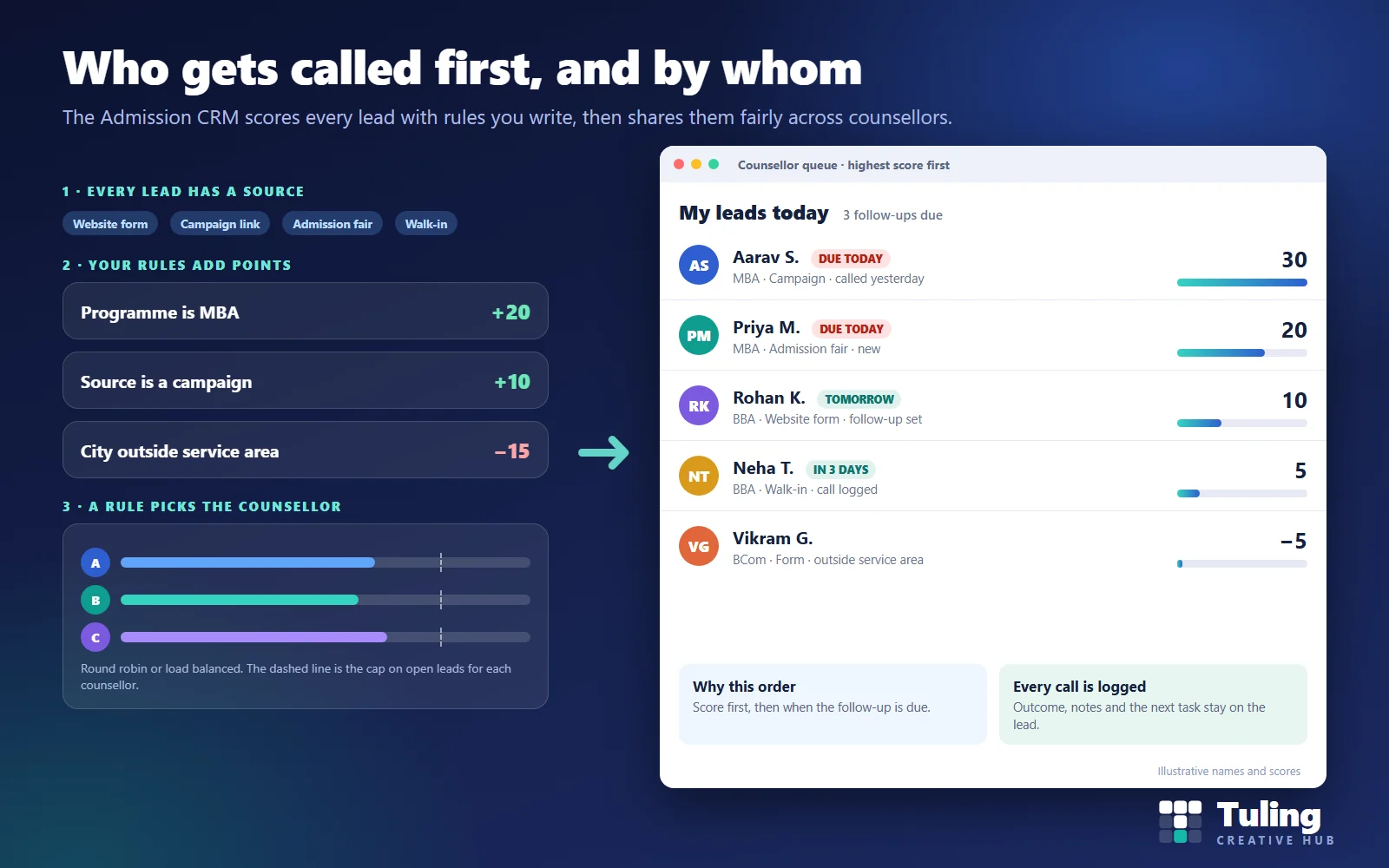
Picture a college that receives over a thousand enquiries in six weeks. Two counsellors are handed most of the walk-ins because they sit nearest the front desk. A third is on leave. The enquiry from a working professional who has already visited campus and wants the MBA waits in a notebook for nine days, while a counsellor calls someone who asked only about hostel fees. This is an invented example, but most admission teams will recognise it.
Nothing is wrong with the people in it. The problem was that nothing told them whom to call first, and nothing shared the work. This guide explains the two ideas that fix that in any college CRM software, lead scoring and counsellor assignment, using the way the Tuling Admission CRM works, and with scenarios you can adapt. If you are still choosing between a CRM and an admission module, start with Admission CRM or admission module: which does your college need?.
Admission CRM software: two separate jobs, score then assign
People often mix these up, so keep them apart.
- Scoring answers: which enquiries look most promising? Each lead gets a number from rules you write.
- Assignment answers: who should handle this lead? A distribution rule picks a counsellor.
You can use either alone. A small team with two counsellors might score leads and let both work from one shared queue. A large team might skip scoring at first and just share leads fairly. Most colleges with several programmes and a counselling team use both.
Step 1: know where the lead came from
Scoring is much better when every lead carries its source. In the Admission CRM each lead records where it came from, whether a web form, a campaign link, an admission fair or a walk-in. Campaign links carry UTM tags so you can tell one advertisement from another, and each source can carry a cost per lead. That matters later, because the best evidence for your rules is which sources actually produced enrolments.
Step 2: write scoring rules
A scoring rule has three parts: which lead field to look at, how to test it, and how many points to add or take away.
The CRM tests fields using equals, contains, in, not in, between, greater than and less than. Points can be positive or negative. Rules are evaluated by priority, and the CRM keeps a breakdown showing which rules produced a score, so a counsellor or head can see why a lead ranks where it does. There are also statistics on how scores are distributed across your leads.
An illustrative rule set for a college with MBA and BBA programmes
These points are examples, not recommendations.
| Rule | Test | Points |
|---|---|---|
| MBA applicant | Programme equals MBA | +20 |
| Came from a campaign | Source in campaign links | +10 |
| Visited the campus | Source equals walk-in | +10 |
| Local to the college | City in your service cities | +5 |
| Outside the service area with no hostel interest | City not in service cities | −15 |
Why these? Imagine the college’s last two seasons showed that MBA enquiries convert at a higher rate than BBA and that walk-ins convert better than form fills. The rules write that history down. A local MBA lead from a campaign scores 35 (20 + 10 + 5), and so does a local MBA walk-in. A BBA lead from a form, outside the service area, scores −15 and will not take up a counsellor’s morning.
Rules to avoid
Do not score on attributes such as religion, caste, gender or similar sensitive details. Scoring is meant to prioritise follow-up, and using sensitive attributes can be unfair and can create compliance problems. Keep rules to practical signals: programme, source, location, completeness and responsiveness. The score should never be treated as an admission decision. Admission decisions follow your published eligibility and merit rules in the admission module, not the CRM score.
Step 3: share leads fairly
Once a lead is scored, a distribution rule chooses the counsellor. In the Admission CRM a rule can:
- Match on lead details, such as programme, source or city, so MBA leads go to the MBA counsellors.
- Pick a strategy: round robin (turns), load balanced (whoever has the fewest open leads), random, or manual.
- Use a pool: the counsellors who can receive these leads.
- Set a cap: the maximum number of open leads each counsellor may hold. If every counsellor in the pool is at the cap, the lead is left unassigned instead of being forced onto someone.
Every assignment is recorded, and a fairness view shows whether work is spread evenly.
Round robin or load balanced? Round robin is simple and predictable: counsellor A, B, C, then A again. It works well when all counsellors work similar hours. Load balanced works better when some counsellors are slower, part-time or on leave, because it sends the next lead to whoever has the least open work.
Scenario 1: a college with three counsellors and two programmes
Illustrative numbers, not client data.
A college with 1,000 students runs BBA and BCom, with three counsellors and a few hundred enquiries in the season.
Setup. Two rules: score by programme and source, and share leads by round robin across all three counsellors. No cap yet, because volumes are modest.
What changes. Each counsellor opens a queue sorted by score and due date. The campus-visit leads are at the top. Everyone gets roughly the same number of leads without a manager handing them out each morning.
What to watch. After two weeks, check whether the top-scoring leads are in fact converting. If not, change the points.
Scenario 2: a college with ten counsellors and an advertising push
Illustrative numbers, not client data.
A college with 4,000 students runs a social media campaign and gets 800 leads in one week.
Setup. Programme-based distribution rules so MBA leads go to a pool of three MBA counsellors and undergraduate leads go to a pool of seven. Load balanced strategy. A cap on open leads per counsellor.
What changes. The surge does not bury anyone. When the MBA pool hits its cap, new MBA leads wait unassigned until someone has room, which is your signal to bring in help or pause the campaign. Without the cap, the first counsellor to log in would have held hundreds of leads and answered none of them.
Scenario 3: a counsellor goes on leave
Illustrative numbers, not client data.
One counsellor is away for a week with 60 open leads.
What to do. Remove that counsellor from the pool so no new leads arrive. Reassign the open leads in bulk to colleagues using load balancing. The assignment record shows who held each lead and when it changed, so follow-up history is not lost.
Scenario 4: a small institute with one counsellor
Illustrative numbers, not client data.
A professional institute has one counsellor and 1,500 enquiries from paid ads.
What to do. Skip distribution entirely. Use scoring only, so the single counsellor works from the top of a ranked list instead of from the order the enquiries arrived. Consider a telecaller for the lowest-scoring leads.
Reviewing your rules each season
Scoring rules go stale. Each season, pull the leads that enrolled and the leads that did not, and compare their scores. If your top-scoring leads are not enrolling, your rules are wrong. Source ROI and stage conversion reports in the CRM help here. Our guide to admission funnel metrics and the seat forecast shows what to measure.
A simple review routine:
- List last season’s enrolled students and their original lead details.
- Find which programmes, sources and cities appear most often.
- Raise points for those; lower points for sources that cost money and rarely convert.
- Run the new rules on a small sample before switching them on for everyone.
- Write down what you changed and why.
After the lead is scored and assigned
The counsellor works the lead: call, log the outcome, set the next follow-up. Our guide to a counsellor’s follow-up routine covers that. When the applicant is accepted, the CRM can hand the record to the admission module, described in how the CRM hands an applicant to the admission module.
How Tuling approaches it
The Admission CRM includes lead sources with campaign tracking and cost per lead, rule-based lead scoring, distribution with a cap per counsellor and a fairness view, calls and tasks, an applicant portal and a dashboard. It connects to Tuling Admissions, and the score travels with the applicant. Email is part of the CRM. SMS and WhatsApp are available as a paid integration, set up on request with the provider you use. Pricing is by quote; see how pricing works.
Data protection note
Enquiries contain personal details, sometimes of minors, and scoring uses them. Tell people in your enquiry form what you collect and why, respect opt-outs, and keep scoring rules documented so you can explain them. For notices and consent, see DPDP notices and consent for school and college admissions.
How this guide was made
The product behaviour described here was checked against the working Admission CRM. The scoring rules, scores, volumes and scenarios are illustrative examples, not client data. This guide was drafted with AI assistance and reviewed by the Tuling team.
Frequently asked questions
What is lead scoring in a college admission CRM?
It is a set of rules that adds or subtracts points from an enquiry based on its details, such as programme, source or location. The total score shows on the lead so counsellors know whom to call first.
What kinds of rules can I write?
In the Tuling Admission CRM a rule can test a lead field using equals, contains, in, not in, between, greater than or less than, and can add or subtract points. Rules are evaluated by priority, and the CRM shows a breakdown of how a score was reached.
How are leads shared between counsellors?
A distribution rule picks the counsellor. The strategy can be round robin, load balanced, random or manual, over a pool of counsellors you choose. You can cap how many open leads each counsellor holds. If everyone is at the cap, the lead waits unassigned instead of piling onto one person.
Is it fair to score applicants?
Scoring ranks enquiries for follow-up speed. Keep rules to practical signals such as programme, source and responsiveness, and never use sensitive attributes. Use scoring to decide who to call first, not who to admit. Admission decisions follow your published merit and eligibility rules.
Can we change the rules during the season?
Yes. Review rules against actual conversions after each intake round and adjust points. Keep a note of what you changed and why.
See scoring and assignment on your own programmes
Bring two or three programmes and your last season's enquiry sources. We set up sample rules with you and show how the queue changes.
Book a demo- Admission CRM
- Admission software
- Lead scoring
- College admissions