Most colleges that run a CRM and a separate admission desk lose a few applicants at the join. Nobody means to. A counsellor marks an applicant as accepted, a clerk is supposed to enter them into the admission system, the clerk is busy, and in July somebody asks why forty accepted students have no application.
The hand-over between an admission CRM and a student admission management system is the weakest point of any two-system setup, and it is rarely tested before the season starts. This guide walks through how the hand-over works in the Tuling Admission CRM and Tuling Admissions, what to set up in advance, what can go wrong, and a pilot you can run in a week. If you are still deciding whether you need both, read Admission software for schools and colleges: what to choose by size and programmes.
What the hand-over is for
A CRM manages the stage before a formal application: enquiries, follow-up, scoring. The admission module manages what follows: application, documents, review, merit, fee challan and enrolment. The two systems hold the same person at different moments. If the details are re-typed in between, two things happen. Typing errors appear in names, phone numbers and emails. And the applicant’s history, the source, the counsellor notes and the score, stays behind in the CRM where the admission officer cannot see it.
A good hand-over moves the person, with their context, exactly once.
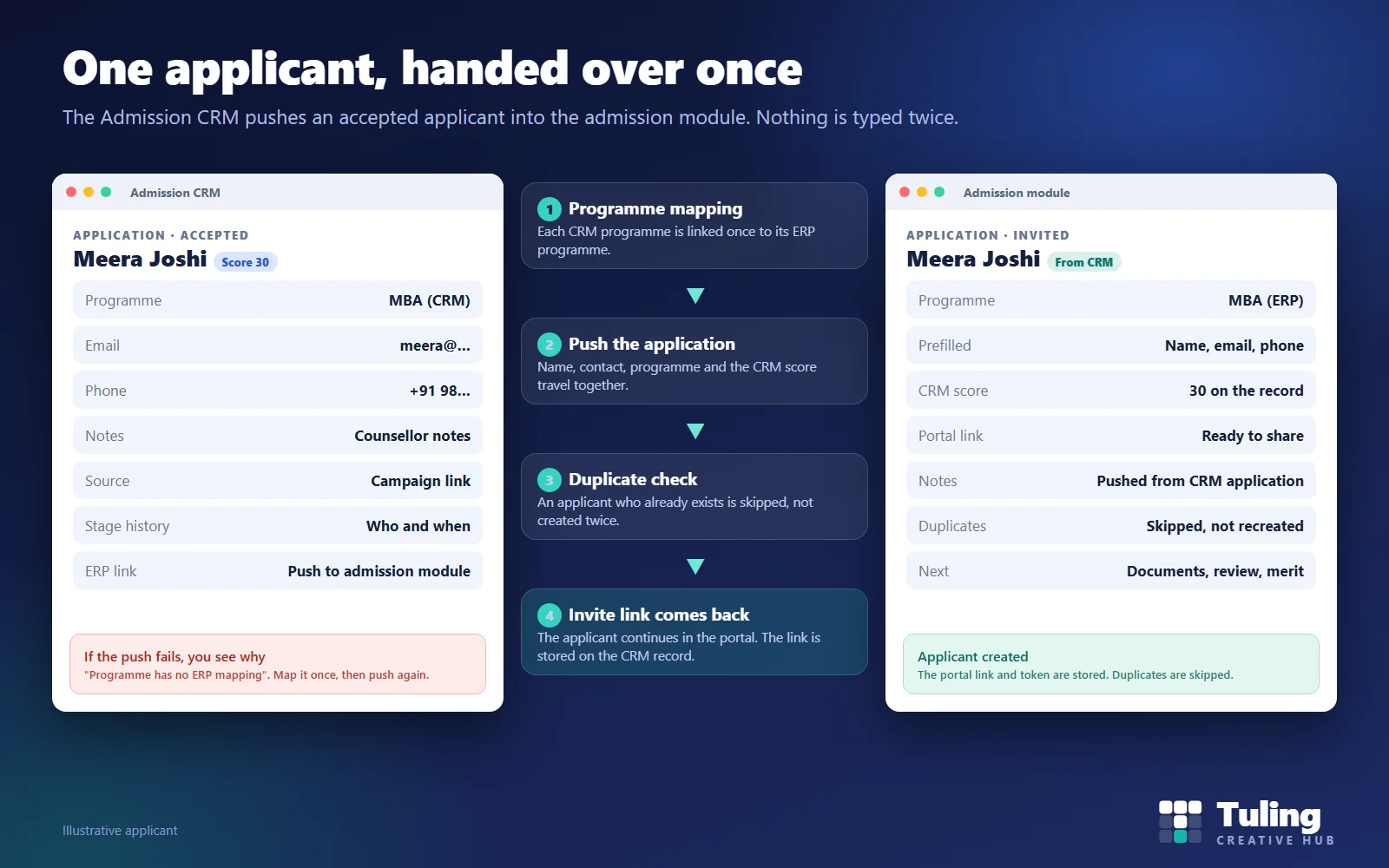
The four steps from admission CRM to student admission management system
1. Map each programme once
The CRM has its own list of programmes, and the admission module has its own. They are often named alike but are separate records. Before the season, an administrator links each CRM programme to its matching admission programme. This mapping is the foundation of everything else. It is also the first thing to break when someone adds a new programme in one system and forgets the other.
2. Push the application
When an application in the CRM is moved to accepted, the CRM pushes it to the admission module automatically. Staff can also push a single application again by hand, which is useful after a fix. The push carries:
- the applicant’s name, email and phone
- the mapped programme
- the CRM lead reference, so the two records can be traced to each other
- the CRM lead score
- a note that it was pushed from a given CRM application
3. Duplicates are skipped
The push asks the admission module to skip duplicates. If the person is already there, for example because they walked in to the desk while the CRM counsellor was still talking to them, a second record is not created. This is much cleaner than discovering two half-complete applications for the same student.
4. The invite link comes back
The admission module returns an invite token and a portal link. The CRM stores them on the application. The applicant uses the link to continue in the admission portal, where the remaining steps happen: documents, review, merit, fee challan and enrolment. The name, email, phone and programme already sent are on the record, so the applicant does not begin from nothing.
If something goes wrong
A hand-over you can trust is one that fails loudly. Here is what happens in each common case.
| What goes wrong | What you see | What to do |
|---|---|---|
| The programme has no mapping | The push fails with the reason, such as “programme has no ERP mapping” | Map the programme once, push again |
| The admission module is unreachable | The push fails and the reason is recorded | Run the connection test, then push again |
| The applicant already exists | The push skips the duplicate | Check the existing record and carry on there |
| The CRM application has no programme | The push fails with the reason | Set the programme in the CRM, push again |
Two design choices make this safe. First, a failed push never undoes the acceptance. The counsellor’s decision stands, and the failure is a task for the admissions team. Second, the reason is recorded against the application, so the person fixing it knows what is wrong without asking.
Scenario 1: a college adds a programme mid-season
Illustrative scenario.
A college opens a new PG diploma in the second month of the season. The admissions team creates the programme in the CRM and starts taking enquiries. Nobody tells the registrar, who owns the admission module.
Three weeks later the first diploma applicants are accepted in the CRM. Every push fails with the reason that the programme has no mapping. Because failures are recorded and the acceptances stand, nothing is lost. The registrar creates the programme in the admission module, the administrator maps it, and the team pushes the accepted applications again.
The lesson: make “map the programme” part of the checklist for opening any new programme.
Scenario 2: the walk-in who is also a lead
Illustrative scenario.
A parent enquires by phone in October. A counsellor logs the lead in the CRM. In November the same parent arrives at the admission desk with the child and the desk takes the application directly. In December the counsellor marks the lead as accepted.
Without a duplicate check this produces two records for one student. With it, the push skips the duplicate. The admission officer sees one application. The counsellor reconciles the CRM record and the lead is closed.
Scenario 3: a 1,300-admission season
Illustrative planning numbers.
A college admitting around 1,300 students a year may accept several hundred applicants in the busiest week. Typing each into the admission module is hours of clerical work and an error source. Automatic push on acceptance removes that typing. Each accepted applicant arrives in the admission module with an invite link already stored on the CRM record.
Scenario 4: some applicants never come through the CRM
Not every applicant begins in the CRM. Walk-ins, spot admissions and some referrals go straight to the admission desk, which has its own enquiry register. That is fine. The two paths meet in the admission module, and the duplicate check keeps them from colliding.
Run a one-week pilot before the season
- Connect and test. Enter the admission module’s address and its admissions API key in the CRM and run the connection test.
- Map one programme. Pick a programme you will use heavily and map it.
- Create five test applications. Move them to accepted. Confirm each appears in the admission module with the right details and score.
- Break it on purpose. Accept an application whose programme has no mapping and read the failure message. Fix it and push again.
- Test a duplicate. Add a person in the module first, then push the same person from the CRM. Confirm only one record exists.
- Check the applicant side. Open the invite link as the applicant and confirm the details sent from the CRM are correct.
- Write down who owns the failures. Someone must check failed pushes daily.
Run the pilot on test data, not on real applicants.
Who owns what
| Task | Owner |
|---|---|
| Programme creation in both systems | Registrar or admissions head |
| Programme mapping | Administrator |
| Marking applications accepted | Counsellor |
| Reviewing failed pushes | Admissions coordinator |
| Connection test and API key | IT administrator |
How Tuling approaches it
The Admission CRM and Tuling Admissions are separate products that work alone or together. In the combined setup the CRM links to the admission module with an address, a tenant reference and an admissions-scoped API key that is stored encrypted, plus a connection test. The hand-over behaves as described above. See the Admission CRM and Tuling Admissions pages. SMS and WhatsApp for follow-up are available as a paid integration, set up on request. Pricing is by quote; see how pricing works.
Data protection note
A hand-over moves personal data from one system to another. Make sure your enquiry notice tells people their details will be used to process an application, record consent in the admission module before documents are processed, and keep access to the connection key limited. See DPDP notices and consent for school and college admissions and children’s data and parent consent at colleges.
How this guide was made
The behaviour described here was checked against the working Admission CRM and its link to the admission module. The scenarios and volumes are illustrative, not client data. This guide was drafted with AI assistance and reviewed by the Tuling team.
Frequently asked questions
What gets passed from the CRM to the admission module?
The applicant's name, email, phone, the mapped programme, the CRM lead reference, the CRM score and a note that it came from the CRM. The module then returns an invite token and portal link for the applicant.
What if the applicant already exists in the admission module?
The push skips duplicates, so a second record is not created.
What if the push fails?
The acceptance in the CRM stands. The CRM records why the push failed, for example that the programme has no mapping, so you can fix the cause and push that application again.
Is the connection secure?
The admission module issues an API key scoped to admissions. The CRM stores it encrypted, and a connection test checks that the link works before you rely on it.
Can the CRM run without the Tuling admission module?
Yes. The CRM runs on its own. The built-in hand-over described here targets Tuling Admissions. If you use a different system, ask about the CRM's open API during a demo.
See an applicant move from CRM to admission desk
We walk through programme mapping, an accepted application, the duplicate check and the invite link on a sample intake.
Book a demo- Admission CRM
- Admission software
- Integration
- College admissions