Picture two principals asking the same question: “Which admission software should we buy?” One runs a school with 2,000 students. The other runs a college with 4,000 students and eleven programmes. They need different things, and the difference has very little to do with the 2,000 and the 4,000.
This guide to choosing admission management software for a college or a school is for both of them, and for everyone in between. It walks through the journey of a single admission, shows how the answer changes with the size of your intake and the number of programmes you run, and works through six scenarios you can match against your own institution.
If you want the plain definition of a CRM versus an admission module first, read Admission CRM or admission module: which does your college need?. This guide assumes you know the difference and want to decide.
Admission software for college and school: the short answer
| Your institution | Where it hurts most | Start with | Add later |
|---|---|---|---|
| School, about 2,000 students, mostly walk-in admissions | Registers, document chasing, fee confirmation | Admission module | CRM if you start running campaigns |
| School, about 2,000 students, most enquiries from ads and forms | Slow follow-up, no idea which source works | CRM | Admission module |
| College, about 1,000 students, 2 to 3 programmes | Paperwork and merit lists | Admission module | CRM |
| College, about 4,000 students, many programmes | Both follow-up and paperwork | Both, connected | Reports and fee integrations |
| Multi-campus group, 10,000 students | Consistency across campuses, reporting | Both, connected, with one setup per campus | Group-level analytics |
| Small institute, 400 students, heavy advertising | Converting paid leads | CRM | Admission module when applications grow |
The rest of this guide explains why each row looks the way it does.
Why total student count is the wrong question
A school of 2,000 students does not admit 2,000 people a year. Most of those students are already enrolled and only a fraction of the roll changes each year. What matters for admission software is:
- New admissions per year. How many seats do you actually fill?
- Enquiries per admission. For every student who joins, how many people called, visited or filled a form? This ratio sets the volume your counsellors must handle.
- Number of programmes. Each programme has its own documents, eligibility, seats and sometimes its own merit list.
- Size of the counselling team. Two people can share a notebook. Ten cannot.
- How leads arrive. Walk-ins and referrals behave differently from leads that come from advertising and web forms.
A quick way to estimate your own numbers: take last year’s new admissions, multiply by the number of enquiries you usually need for one admission, and divide by the number of counsellors. That last figure is the number of enquiries each counsellor handles in a season.
A rough rule of thumb, which is our own assumption and not an industry statistic: when one counsellor is holding more than about a hundred active leads at a time, a notebook or a shared sheet starts to lose people. Below that, a well-run register can work. Above it, you need something that reminds and reassigns.
The journey of one admission
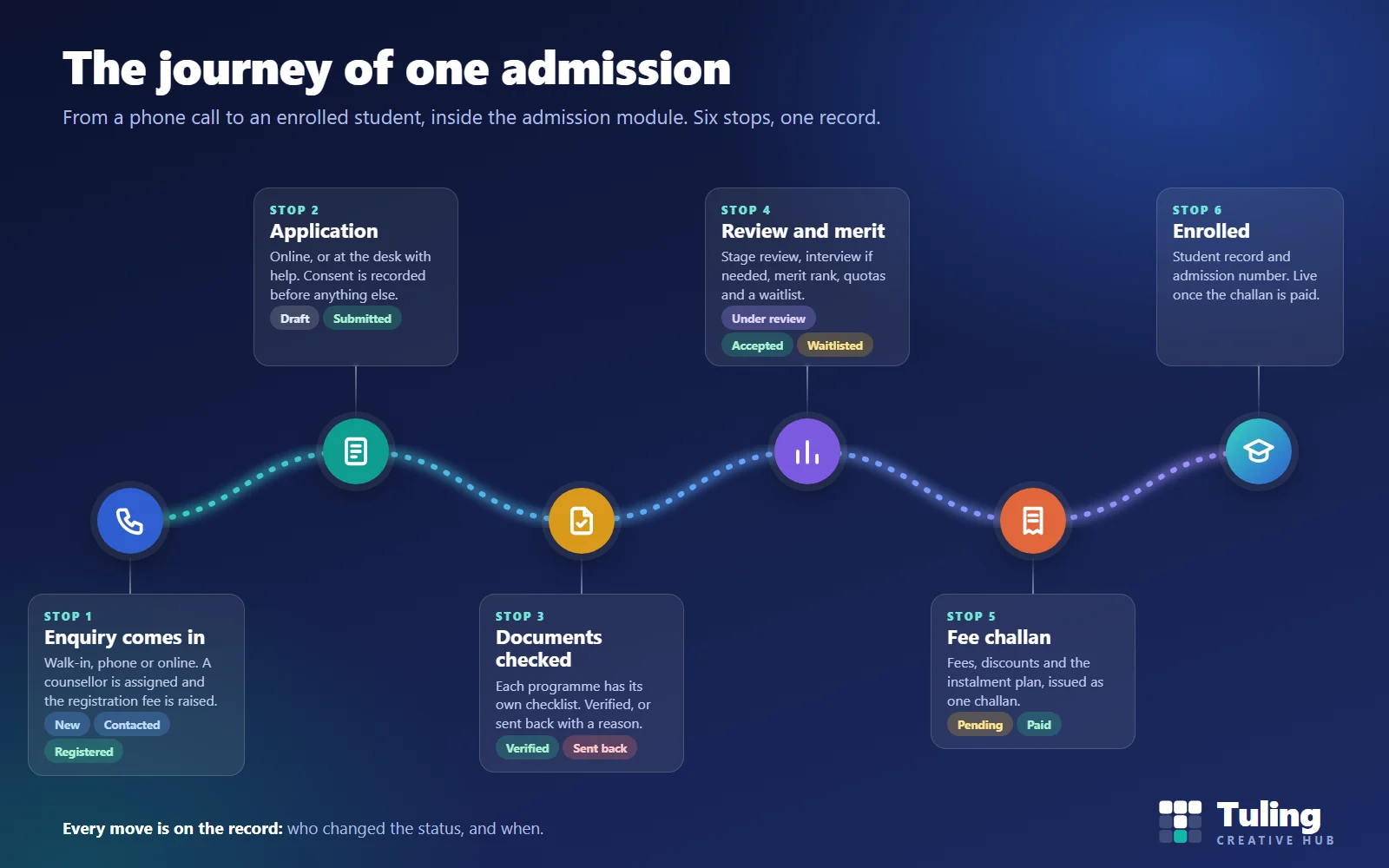
The image at the top of this page shows six stops. They are the same whether you run a school or a university. What changes is how many people travel the path at once, and how many different paths (programmes) exist.
Stop 1: the enquiry comes in. A parent walks in, a student calls, or a form is filled on the website. The enquiry is recorded with its source, assigned to a counsellor, and a registration fee is raised. In Tuling Admissions every admission starts from an enquiry whose registration fee is paid. Look for: one register for walk-ins, phone calls and online forms, and a status such as new, contacted or registered, so you know where each person is.
Stop 2: the application. The applicant fills the form online, or at the desk with a staff member’s help. Privacy consent is recorded before any data or documents are processed. Look for: forms that follow the programme, desk entry for people who cannot apply online, and a draft state so applicants can return.
Stop 3: documents are checked. Each programme has its own checklist. Documents are uploaded and either verified or sent back with a reason. Look for: a per-programme document list, and a visible reason when something is returned, so applicants do not call the office to ask what is wrong.
Stop 4: review and merit. The application is reviewed, an interview is held if the programme needs one, and applicants are ranked where a merit list applies. Seats and quotas are checked, and applicants beyond the cut-off can be waitlisted. Look for: merit lists per programme, ranks that can be imported from an entrance test, seat limits and a waitlist you can act on.
Stop 5: the fee challan. Fees, any approved discount and the instalment plan are combined into one challan that goes to the accounts counter. Look for: a challan that carries the fee structure for that programme, and a clear approval trail for discounts.
Stop 6: enrolment. The admission number is issued and the student profile is activated. Hostel and transport can be allotted straight after. Look for: no re-typing. The student record should be created from the application, not from a second data entry.
Every status change along the way should record who made it and when. When a parent says “I was told my admission was confirmed,” that trail is the only fair way to settle it.
Scenario 1: a school of 2,000 students, mostly walk-in admissions
Illustrative planning numbers, not client data.
A school of 2,000 students from nursery to Class 12 on one campus might admit 150 to 250 new students a year, mostly at the entry classes, with a few lateral admissions in higher classes. If it receives three to five enquiries for every admission, that is roughly 450 to 1,250 enquiries in the admission season. The front office has two or three people, and most families visit in person.
What goes wrong without software. The enquiry register is a bound book at the front desk. A parent who visited in November is not called back in January because nobody noticed. Documents are collected in a file, and on the day of admission the clerk discovers the birth certificate is missing. The fee is checked in one office and the admission confirmed in another.
What to choose. Start with an admission module. The first problem is not winning more enquiries. It is not losing the ones you have and not making a mess of the paperwork. You want an enquiry register with source and status, registration fee tracking, a document checklist, a fee challan and an enrolment that creates the student record.
What to check before you buy. Tuling’s admission module is built around programmes and intakes, which suits colleges naturally. Its enquiry, registration fee, document, challan and enrolment flow applies to a school too. But school rules such as class-wise forms, sibling or staff-ward concessions and entrance interaction schedules should be shown to you in a demo with your own rules before you commit. Any vendor you talk to, including us, should be willing to do that.
When to add a CRM. If the school begins paid campaigns, collects enquiries from a web form or hires a telecaller, add the CRM then. The enquiries will outgrow a register.
Scenario 2: the same school, but most enquiries come from advertising
Illustrative planning numbers, not client data.
Take the same 2,000-student school, but now it runs ads in the months before the session begins and receives over a thousand enquiries through web forms and campaign links. The same two or three staff members are expected to call everyone back.
What goes wrong. Leads from the form and leads from a hoarding enquiry number land in different places. Nobody knows which source brings serious families, so the ad budget is guessed. Follow-ups slip, and families who were keen in October have enrolled elsewhere by December.
What to choose. Start with an admission CRM. You want every lead to carry its source, a score so the most serious enquiries are called first, and fair distribution so one counsellor is not buried while another is idle. Tuling’s Admission CRM records the source and campaign for each lead along with cost per lead, scores leads using rules you write, and assigns them by round robin or by load, with a limit on how many open leads each counsellor can hold.
When to add the module. Once applications start arriving in volume and the paperwork becomes the bottleneck. The CRM can pass an accepted applicant into the admission module so the details are not typed twice. See the hand-over section below.
Scenario 3: a college of 1,000 students with two or three programmes
Illustrative planning numbers, not client data.
A college with 1,000 students across, say, BBA, BCom and a postgraduate programme might admit around 300 to 400 new students a year, because most students stay for three years. At five to six enquiries per admission, that is roughly 1,600 to 2,400 enquiries. Two counsellors handle them, and most of the families are local.
What goes wrong. The problems are in the middle of the journey. Each programme has a different document list, so the admission officer works from three printed checklists. Merit lists are built in a spreadsheet the night before the counselling round. Nobody can show later how the ranking was done. The fee challan is prepared by hand, and the registrar re-types the admitted student into the student record.
What to choose. An admission module is the right first purchase. Look for intakes opened per programme with their capacity and dates, document lists per programme, a merit list per programme with a clear record of how it was built, and enrolment that creates the student record from the application. The merit list matters most here, because it is where disputes start. Our guide to generating a college merit list without a spreadsheet covers what a trustworthy process looks like.
When to add a CRM. When enquiry volume or the number of counsellors grows, or when you want to see which campaigns produce admissions.
Scenario 4: a college of 4,000 students with many programmes
Illustrative planning numbers, not client data.
A college with 4,000 students across undergraduate programmes, a few postgraduate programmes and a diploma might admit around 1,300 new students a year if the average programme lasts three years. At five to eight enquiries per admission, that is on the order of 6,500 to 10,500 enquiries a season. A team of counsellors and telecallers works the leads, and the admission desk runs several selection processes at the same time.
What goes wrong. Both ends of the journey are under pressure at once. Counsellors cannot tell which of thousands of enquiries to call first. The same applicant may be recorded twice, once by the telecaller and once at the desk. Different programmes have different eligibility, documents, seat quotas and merit rules, so the desk runs several processes in parallel. The accounts team gets challans late, and the principal asks every Monday how many seats are filled in each programme and cannot get a straight answer.
What to choose. Both products, connected. The CRM handles the top of the funnel: sources, scoring, distribution and follow-up. The admission module handles the formal process: application, documents, review, merit, seats and quotas, fee challan and enrolment. The connection matters as much as either product. When an application is accepted in the CRM, it should move into the module with its details, its score and a link for the applicant to continue, and it should not create a duplicate if the person already exists.
How the setup looks. One intake per programme, each with its own capacity and dates. Document lists and forms per programme. Merit lists and quotas per programme. Counsellors assigned by rule, with a cap on open leads each. A funnel report that shows enquiries, applications, offers and enrolments per programme, so the Monday question has an answer.
Scenario 5: a group with 10,000 students on three campuses
Illustrative planning numbers, not client data.
A group with 10,000 students across three campuses might admit over 3,000 students a year. The questions now go beyond speed: is each campus following the same process, and can the head office see all of them?
What to choose. Both products, connected, with each campus’s programmes and intakes set up inside one system. Ask how the vendor handles multiple campuses, who can see which campus’s data, and whether the reports can be cut by campus and by programme. Do not accept a separate installation per campus if you want group-level reports. Pricing for multi-campus groups is quoted individually, so bring your campus and student numbers to the conversation.
Scenario 6: a small institute with heavy advertising
Illustrative planning numbers, not client data.
A professional institute with 400 students offers a one-year postgraduate diploma and spends most of its marketing budget online. It admits perhaps 150 students a year, but receives 1,500 or more enquiries from ads, webinars and partner sites.
What goes wrong. The student count says “small”, but the enquiry volume is large. Counsellors are overwhelmed, and money is spent on leads that nobody follows up.
What to choose. Start with the CRM, even though the institute is small. Its problem is conversion, not paperwork. The application and document process for 150 students can run on a simple form and a checklist for a while. Add the admission module when the paperwork starts to hurt.
This scenario is why we say the number of students is the wrong starting question.
How programmes change the setup
Whatever your size, the programmes you offer shape the admission process more than your headcount does.
| Programme type | What typically differs | What your software should let you set |
|---|---|---|
| Undergraduate | Board marks, category and quota proofs, large intake | Document list, eligibility, merit basis, seat quotas, waitlist |
| Postgraduate | Graduation marks, entrance test or interview, smaller intake | Entrance rank import, interview step, merit list |
| Diploma | Mixed eligibility, rolling or multiple intakes | Separate intakes and dates, lighter document list |
| Doctoral | Proposal, supervisor and committee approval | Staged review by several approvers, flexible forms |
| Professional or lateral entry | Prior qualification checks, limited seats | Eligibility rules and seat limits per programme |
In Tuling Admissions an intake is opened for each programme with its own capacity and dates, documents are collected against the list each programme asks for, merit lists are built per programme with ranks that can be imported, and seats and quotas can be set for each programme. Application forms can follow the programme, with templates for bachelor, master, doctoral and diploma programmes. A college with eleven programmes does not need eleven tools. It needs one tool that treats each programme as its own setup.
What happens when the CRM and the module are connected
Here is the hand-over, step by step, for the college in Scenario 4.
- Map each programme once. Every programme in the CRM is linked to its matching programme in the admission module.
- Push an accepted application. The applicant’s name, contact details, programme and CRM score travel to the admission module.
- Duplicates are skipped. If the applicant already exists, the module does not create a second record.
- An invite link comes back. The applicant uses it to continue in the portal, and the link is stored on the CRM record.
If a push fails, the CRM shows the reason, for example that a programme has no mapping. The team fixes it once and pushes again. That is much better than finding out in July that forty applicants never reached the admission desk.
Eight questions to decide
- How many new students did we admit last year, and in which programmes?
- How many enquiries did we receive for those admissions?
- How many counsellors handle them, and how many open leads does each hold at the peak?
- Where do our enquiries come from, and do we know which source produces admissions?
- How many different document lists and merit rules do we run?
- How long does it take from the first complete application to a confirmed admission?
- How many times is the same person typed into a system by hand?
- Who asks about seats filled every week, and how long does it take to answer?
If your pain is in questions 3 and 4, look at a CRM. If it is in questions 5, 6 and 7, look at an admission module. If it is in both, plan for both and make sure they connect.
How Tuling approaches it
Tuling offers the two as separate products that work on their own or together. Tuling Admissions is the admission desk of the Tuling ERP, covering the enquiry register, online application, desk entry for walk-ins, document checks, merit lists, programme intakes and seats, fee challans, enrolment, readmission and withdrawal. The Admission CRM covers lead capture, lead scoring, distribution, follow-up tasks, an applicant portal and a dashboard that answers whether you will fill your seats.
The CRM can run on its own, and it can push accepted applicants into Tuling Admissions as described above. Email is part of the CRM. SMS and WhatsApp are available as a paid integration, set up on request with the provider you use.
Pricing is by quote, based on your staff and student numbers, campuses and the modules you pick, so the sensible first step is to see how pricing works and bring your own numbers. If you want a broader view, our page on college admission software describes the whole flow.
Data protection in admissions
Admissions collect phone numbers, marksheets, identity documents and, for many applicants, details of minors. Whatever software you choose, it should record consent before it processes data, keep a record of who changed what, and let you answer a data request. Tuling Admissions records privacy consent before any data or documents are processed. For the rules on notices and parental consent, read DPDP notices and consent for school and college admissions and children’s data and parent consent at colleges.
How this guide was made
The product behaviour described here was checked against the working Tuling Admissions module and Admission CRM. The institution sizes, intake figures and enquiry ratios are illustrative planning assumptions, not client data and not industry statistics. Replace them with your own figures. This guide was drafted with AI assistance and reviewed by the Tuling team.
For the step-by-step process itself, see the admission process for colleges, step by step and admission to enrolment in six steps.
Frequently asked questions
Is there admissions software for higher education institutions?
Yes. Higher education admissions software has to handle several programmes, each with its own intake, documents and merit list. Tuling Admissions does this for colleges, and Tuling CRM can sit in front of it for enquiries and follow-up.
What admission software should a school with 2,000 students choose?
Count your new admissions and enquiries first. A school of that size often admits a few hundred new students a year, mostly at entry classes, so the first need is usually an enquiry register, registration fee tracking, document checks and a fee challan on one record. Add a CRM only if you run paid campaigns or a telecalling team. Ask any vendor, including us, to demonstrate class-wise forms and school rules such as sibling concessions before you commit.
What should a college with 4,000 students do?
A college of that size usually admits well over a thousand students a year across several programmes, so it benefits from both a CRM for enquiries and an admission module for applications, documents, merit lists, seat quotas, fee challans and enrolment, joined so an accepted applicant is not typed in twice.
Can a small college start with only one of the two?
Yes. A college with two or three programmes and mostly walk-in enquiries can start with an admission module and add a CRM when campaign leads grow. A small institute that spends heavily on advertising can do the reverse and start with a CRM.
Do programmes change what the admission software needs to do?
Yes. Undergraduate, postgraduate, diploma and doctoral programmes differ in required documents, eligibility, how applicants are ranked, how many seats are reserved and whether an interview is held. The software should let you set these per programme, not once for the whole institution.
How does Tuling price admission software?
Pricing is by quote and depends on staff and student numbers, campuses and the modules you choose. There is no public price list. The pricing page explains the starting points and has a quote form.
Bring last year's numbers and we will map your admissions
Share your intake, programmes and counselling team size. We show you the journey on the Tuling Admissions module and the Admission CRM, and tell you honestly which one you need first.
Book a demo- Admission software
- Buyer's guide
- College admissions
- School admissions