The short answer: the DPDP Compliance Center is a dedicated desk where the person responsible for privacy at a school or college runs every privacy duty: answering requests for personal data, erasing it with proof, tracking consent, watching downloads, preparing breach notices and publishing privacy notices. It does not make an institution compliant. It keeps the records, deadlines and evidence that a compliant institution needs.
It is a product in its own right, not a consent checkbox added to admissions or a settings page inside HR. The modules hold the data. The Center is where the institution answers for it.
For the legal background, start with what the DPDP Act means for a college. For a duty-by-duty map of the wider ERP, see how Tuling ERP supports DPDP compliance.
Why a compliance center instead of features in each module?
When a person asks “what do you hold about me?”, the answer is spread across admissions, fees, examinations, attendance, documents and HR. No single module can answer it, and no single module owns the question. In many institutions it lands with the registrar by default, answered from memory and a few spreadsheets, with no record that it was answered on time.
A feature inside one module cannot fix that. A privacy duty crosses modules, so it needs a place that:
- opens only for the role that holds the duty, so day-to-day staff do not see requests that are not theirs;
- reads from every module, so the answer is complete;
- keeps its own records, so the proof does not depend on whoever happens to be on leave; and
- keeps its own clocks, so an overdue request or a running breach is visible on the first screen.
That is the Compliance Center.
What does the Compliance Center include?
A daily view with a privacy health score
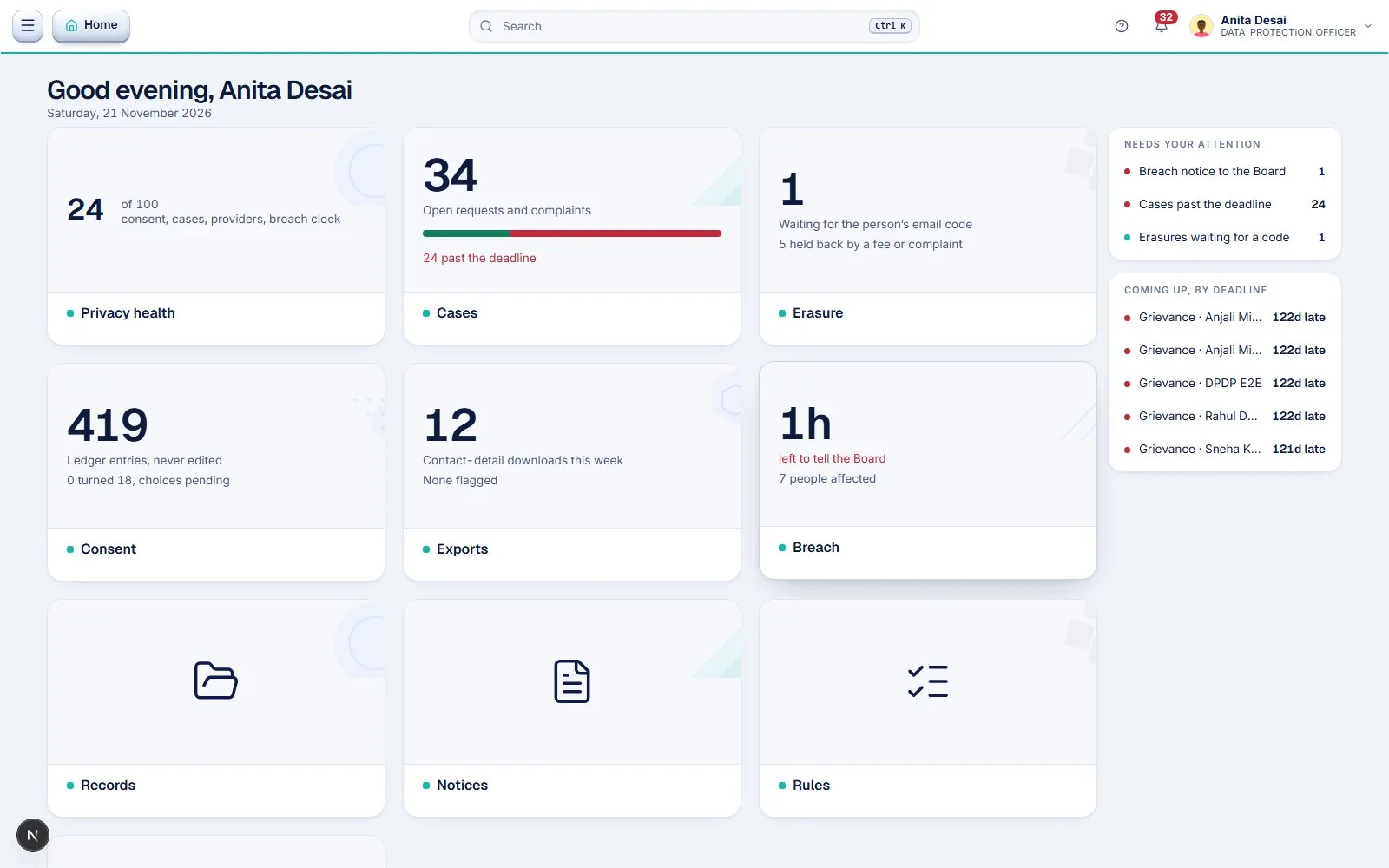
The first screen opens on what needs the DPO today: open requests and complaints with the number past their deadline, erasures waiting for a person’s code, the consent ledger, downloads of personal data this week, and the breach clock. A health score out of 100 summarises consent, cases, service providers and the breach clock. A side list shows what needs attention now and what is coming up by deadline, soonest first.
Rights requests and grievances, with a signed reply
Every access request, erasure request and grievance is a case with an owner, a status and time left, shown in red once it has passed. Students and staff can raise a request from their own portal, and the DPO can record one made in person, by phone or in writing.
An access request follows a fixed path:
- Confirm who is asking. The Center records how identity was checked: logged in to the portal, ID card checked in person, called back on the number on file, or a written request with an ID copy.
- Build the pack from every module. One action collects the person’s data from each module that holds it. For a student that covers records, admissions, academics, fees, examinations, attendance, documents and consent. Staff have their own pack.
- Download and sign. The DPO and a higher authority, such as the Principal or Registrar, sign the reply.
- Upload the signed reply. Nothing can be sent without it.
- Send. The person can download the signed reply, and the case closes with a record of what was sent and when.
If a request cannot be met in full, for example because a legal hold applies during an inquiry, the DPO records the reason in the closing message. Building the pack again replaces the signed reply, and the Center says so first, so a signed document is never swapped silently. The rights and grievances guide explains the time limits.
Erasure with proof
Deleting a person’s data is easy. Deleting only what the institution is free to delete is the hard part, because some records must be kept. The erasure screen finds the person, lists what can be erased, and sends a six-digit code to their email. Nothing is removed until the code is entered. Cases held back by an unpaid fee or an open complaint are counted separately so the reason is visible. Each completed erasure produces a certificate, and a public verification page lets the person, or anyone they show it to, check that it is genuine.
Consent and minors
Every yes and no is written to a ledger once and never edited or deleted, so the institution can show what a person agreed to, when, and under which notice version. For children, the Center links each student to their guardians, and parents confirm who they are by email. When a student turns 18, the Center lists them, parent access stops on the birthday and the student makes their own choices. See the children’s data guide for why this matters.
Download monitoring
The Exports screen shows who downloaded personal data in the last seven days, per day and per person, and flags what looks unusual. It is a monitoring view, not a block. It lets the DPO ask a question early, for example why one account downloaded many contact details in an afternoon, and it feeds the answer to “who accessed this data?” if a breach is ever suspected.
Breach notices
The Breach screen shows the clock and the number of people affected. The technical team finds, stops and writes up the incident. The institution then has two duties: tell the Data Protection Board and tell the people affected. The Center prepares both messages, shows a preview and sends nothing until the DPO presses Send. It stores the Board’s submission reference once the DPO has filed. The breach-response guide covers the first hour.
Privacy notices, versioned
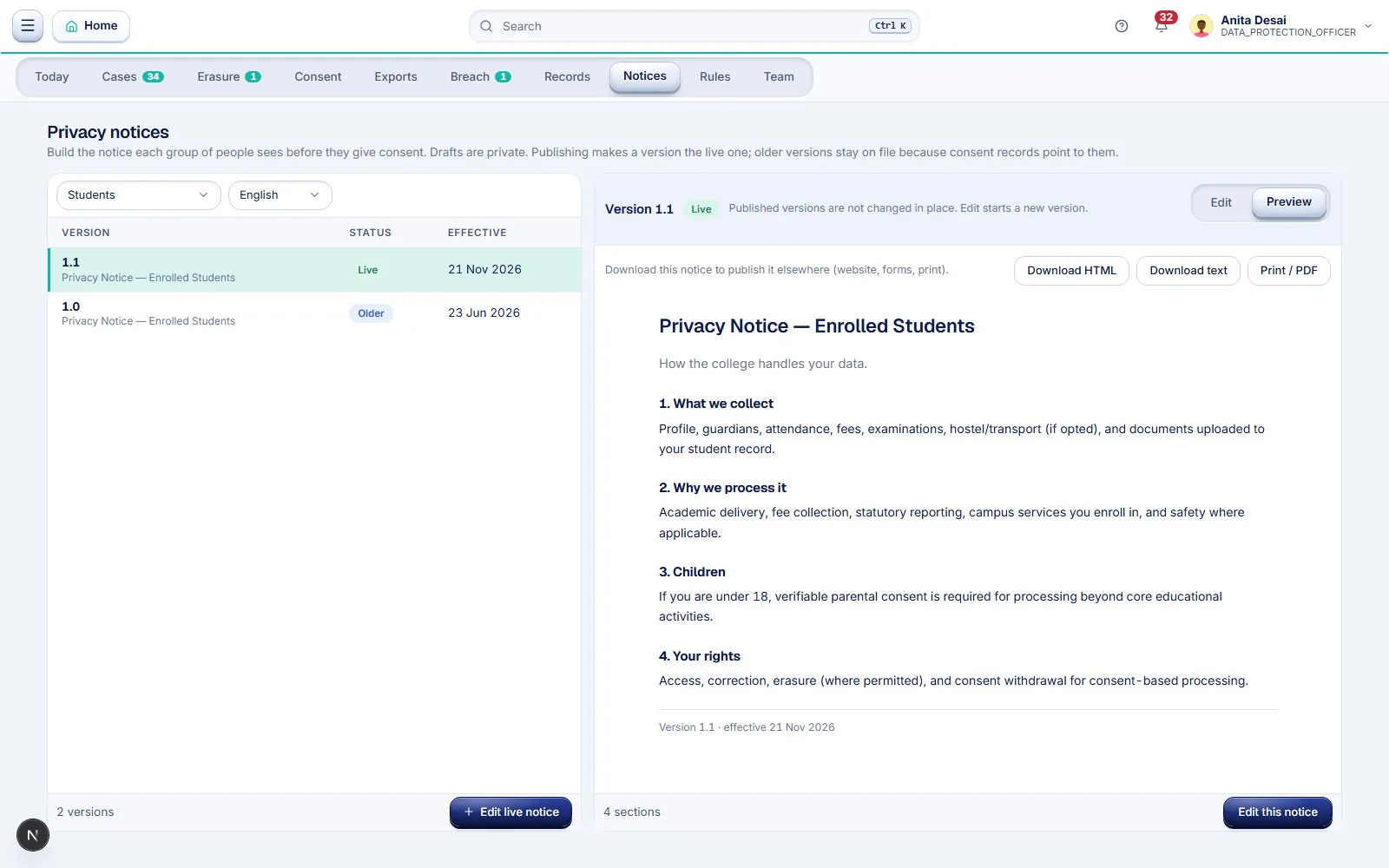
Each group of people, such as enrolled students, applicants, parents and staff, sees a notice before giving consent. The DPO builds the notice for each group and language, previews it and publishes it. Drafts are private. A published version is never changed in place: editing starts a new version, and older versions stay on file because consent records point to them. Any notice can be downloaded as HTML, text or print-ready PDF, so the same wording can go on the website, on forms or on paper.
Records, retention rules and service providers
The Records screen keeps the staff consent roster, the register of service providers that hold data, and what is processed and why. The Rules screen sets what is kept, for what purpose and on what legal ground. Rules fixed by law cannot be switched off. See the retention guide and the vendor guide.
Named DPO, controlled by the institution
The Team screen shows who the DPO is and what the public sees. Only HR or the Super Admin can allocate or change the DPO, so the appointment belongs to the institution.
Which parts of the DPDP Act and Rules does it help you cover?
The table below maps the Center to the sections of the Digital Personal Data Protection Act, 2023 and the rules of the Digital Personal Data Protection Rules, 2025 (G.S.R. 846(E)). “Helps you cover” means the Center keeps the records, reminders and drafts that support the duty. It does not mean the duty is met on its own.
| Provision | What the law asks of a Data Fiduciary | How the Center helps |
|---|---|---|
| Section 5 and Rule 3 (notice) | Give a clear notice with every request for consent: the data, the purpose, how to exercise rights and how to complain to the Board. Offer it in English or an Eighth Schedule language (Section 5(3)). | The Notices screen builds, previews, versions and publishes a notice for each audience and language. The college writes the content, including the withdrawal, rights and Board-complaint details Rule 3(c) requires. |
| Section 6(1), 6(4) and 6(10) (consent) | Consent must be free, specific, informed and unambiguous. It must be as easy to withdraw as to give. If a question arises, the fiduciary must prove that notice was given and consent was obtained. | The consent ledger records each yes and no once against the notice version shown, and entries cannot be edited or deleted. That gives the college a record to answer Section 6(10). |
| Sections 6(3), 8(9) and Rule 9 (contact) | Publish the business contact of the DPO, if applicable, or of a person who can answer questions about processing, and mention it in every reply to a rights request. | The Team screen records who that person is, and only HR or the Super Admin can change it. The college publishes the contact on its website. |
| Sections 8(1) and 8(2) (processors) | Remain responsible for data handled by a Data Processor, and engage processors only under a valid contract. | The Records screen keeps the list of service providers that hold data. The college signs and keeps the contracts. |
| Section 8(5) and Rule 6 (security safeguards) | Take reasonable safeguards, including visibility on who accesses personal data through logs, monitoring and review (Rule 6(1)(c)). | The Exports screen shows who downloaded personal data and flags unusual activity. Encryption, backups and one-year log retention (Rule 6(1)(a), (d), (e)) are infrastructure and contract matters outside this screen. |
| Section 8(6) and Rule 7 (breach) | Tell each affected person without delay, and tell the Data Protection Board without delay and, in detail, within 72 hours (unless the Board allows longer). | The Breach screen shows the clock and the number of people affected, prepares the person and Board messages with a preview, sends nothing until the DPO presses Send, and keeps the Board’s submission reference. |
| Sections 8(7) and 12(3) (erasure) | Erase personal data on withdrawal of consent or when the purpose is no longer served, and cause processors to erase it, unless retention is necessary for the specified purpose or to comply with law. | The Erasure screen lists what can be erased, requires a code from the person, keeps records the law requires and lists the reason, and issues a certificate that records service providers and their confirmation. |
| Sections 8(10), 13 and Rule 14 (grievances) | Have an effective grievance mechanism, publish it, and respond within a period not exceeding ninety days (Rule 14(3)). | Grievances are cases with an owner, status and time left, shown in red once overdue. The college publishes the route on its website, as Rule 14(1) and (3) require. |
| Section 11 (access to information) | Give the person a summary of the personal data processed and the processing activities, and the identities of other fiduciaries and processors it was shared with. | The access workflow builds a pack from every module that holds the person’s data, with a signed reply from the DPO and a higher authority. The provider list on the Records screen helps answer the sharing question. |
| Section 9 and Rules 10 and 12 (children) | Obtain verifiable parental consent before processing a child’s data, and do not track or monitor children unless an exemption applies. | The consent ledger links each student to guardians, parents confirm by email, and the Center lists students turning 18. See the note on schools below. |
| Section 12(2) and Section 14 (correction and nomination) | Correct, complete and update data on request, and allow a person to nominate someone to exercise their rights. | Partly. Staff can raise a correction request and name a nominee in their self-service portal. The DPO desk’s case types are access, erasure and grievance, so the college handles correction and nomination of students through its own record processes. |
| Section 10(2) and Rule 13 (Significant Data Fiduciary) | A notified Significant Data Fiduciary must appoint a DPO and an independent auditor, and carry out a Data Protection Impact Assessment and audit every twelve months. | The Team screen records the DPO. The Center does not perform the impact assessment or the independent audit. |
What changes for schools and colleges
Educational institutions have a specific provision. Section 9(3) bars tracking or behavioural monitoring of children, but Section 9(4) and Rule 12 allow exemptions, and Part A of the Fourth Schedule lists an educational institution as an exempt class. The exemption is narrow: processing must be restricted to tracking and behavioural monitoring for the institution’s educational activities, or in the interests of the safety of enrolled children. It does not remove the need for verifiable parental consent for other processing of a child’s data. The Center does not decide what falls inside the exemption. The college does, and records the purpose on its Rules screen.
Rule 10 requires due diligence that the person giving consent as a parent is an identifiable adult, by reference to reliable details of identity and age the institution already holds, or details the person provides voluntarily or through a virtual token issued by an authorised entity. Email confirmation in the Center links a parent to a student. Whether that is enough for a particular student is a decision for the college.
What the Center does not cover
- Consent Managers (Section 6(7) to (9), Rule 4). The Center is not a registered Consent Manager.
- Cross-border transfer rules (Rule 15) and any restrictions the government notifies.
- Significant Data Fiduciary duties beyond naming the DPO, including the impact assessment and independent audit.
- Penalties and Board proceedings. The Center keeps the evidence; it does not argue the case.
- Timing. Under Rule 1(4), most of the Rules, including Rules 3 and 5 to 16, take effect eighteen months after publication. See the commencement timeline.
Official sources
- The Digital Personal Data Protection Act, 2023 (No. 22 of 2023), Ministry of Electronics and Information Technology
- The Digital Personal Data Protection Act, 2023 on India Code, Government of India
- The Digital Personal Data Protection Rules, 2025, G.S.R. 846(E), Gazette of India (Extraordinary), Ministry of Electronics and Information Technology
- Government notifies DPDP Rules to empower citizens and protect privacy, Press Information Bureau
On 21 November 2026 the section and rule numbers above were compared with the official texts published by the Ministry of Electronics and Information Technology. This article is general information, not legal advice. Check your institution’s status and obligations with a qualified adviser.
What does the college still have to do?
The Center is a tool for a person who has been given the job. It cannot do these for the institution:
- Decide whether a DPO is required and appoint one, or name a privacy contact. See the governance and roles guide.
- Write the notices in the institution’s own words and choose the purposes.
- Choose retention periods and have management agree them.
- Sign agreements with every service provider that handles personal data, including the biometric attendance vendor and the ERP provider.
- Answer within the time limits and keep the first hour of a breach in people’s hands.
- Train staff and review the programme every year.
How does a school or college use it, step by step?
The Center works best when it is introduced in order. Below is the process we suggest, from the first decision to the yearly review. The timings are a planning guide, not a rule; a small school can move faster and a multi-campus college may need longer.
Phase 1: Decide (before anything is switched on)
- Decide who holds the privacy duty. Choose the person who will be the DPO or the named privacy contact. They need authority to ask any department for records, and a higher authority above them, usually the Principal or Registrar, who will co-sign replies. The governance and roles guide helps you decide whether a formal DPO is required.
- List what you hold and where. Note which modules and outside systems hold personal data: admissions, fees, examinations, attendance, hostel, transport, library, HR and any outside vendor. The data-mapping guide shows how.
- List your service providers. Every vendor that touches personal data, including the biometric attendance supplier, payment gateway and the ERP provider, needs a written agreement.
Phase 2: Set up (about two weeks)
- Name the DPO in the Center. HR or the Super Admin records the DPO on the Team screen. This is what the public sees and what the DPO role signs in with.
- Publish a notice for each audience. On the Notices screen, write and publish a notice for enrolled students, applicants, parents and staff, in the languages you use. Preview each one, then publish. These are the notices people see before they give consent.
- Set retention rules. On the Rules screen, record what you keep, why, and for how long. Management should agree these. Rules fixed by law are already locked.
- Fill the records. On the Records screen, add the service providers and confirm the staff consent roster.
- Rehearse once. Raise a test access request from a student login and work it through to a signed reply, then close it. Walk the DPO and the IT head through the Breach screen so everyone knows what the clock and the preview look like before they ever need them. This is where gaps show up, such as a missing co-signer.
Phase 3: Go live (admission season and staff onboarding)
- Consent is collected at the door. Applicants, students and staff see the published notice before they give consent, and each answer is written to the ledger against the version they saw. For students under 18, a parent confirms by email.
- Tell people how to reach you. Publish the privacy contact on your website and in admission material, and tell students and staff that they can raise requests from their portal.
Phase 4: Run it day to day
| When | What the DPO does |
|---|---|
| Daily, five minutes | Open the home screen. Clear anything past its deadline first, then anything coming up. |
| When a request arrives | Open the case, confirm identity, build the pack, get it signed, upload and send. Record a reason if anything is withheld. |
| When someone asks for erasure | Check what is erasable, send the code to the person, complete it and keep the certificate. |
| Weekly | Look at the Exports screen for unusual downloads and ask the account holder about anything odd. |
| Each month | Check the consent screen for students turning 18 and close any open cases. |
| If a breach is suspected | Open the Breach screen, follow the clock, prepare the Board and affected-person messages and send them when ready. |
| Each year | Review notices, retention rules and vendors; rehearse a request again; train new staff. |
A worked example: a student asks what the college holds
- Day 1. A student raises a request from the portal. It appears in Cases with the time left counting down.
- Day 1 to 3. The DPO confirms who is asking. The request came from a logged-in portal account, so the Center records that as the identity check.
- Day 3 to 5. The DPO builds the pack. The Center collects the student’s records from admissions, academics, fees, examinations, attendance, documents and consent, and the DPO downloads it.
- Day 5 to 8. The DPO and the Registrar sign the reply, and the DPO uploads the signed copy.
- Day 8. The DPO sends it with a short message. The student downloads the signed reply, the case closes and the record shows what was sent and when.
The days are illustrative. The Center shows the actual time left against the legal limit on every case, so the DPO is never working from memory.
Who does what
| Role | Responsibility |
|---|---|
| DPO or privacy contact | Runs the Center, answers requests, signs replies, prepares breach notices |
| Principal or Registrar | Co-signs replies as the higher authority |
| HR or Super Admin | Names and changes the DPO; owns the staff side |
| IT head | Finds, stops and writes up any incident; manages access and logs |
| Admissions, fees and exam staff | Keep their records accurate so the pack is complete |
| Students, parents and staff | Read the notice, give or withdraw consent, raise requests from their portal |
| Management | Approves retention rules, vendor agreements and the yearly review |
How do we know it is working?
You do not need a certificate. You need to be able to show, on any day, that requests were answered on time, that each person’s consent matches the notice they saw, that erased data has a certificate and that you can tell who downloaded what. If the home screen shows nothing past its deadline and your rehearsal passes each year, the process is working.
To see this on your own records, book a demo. We will walk through the same steps with your registrar and IT head.
Frequently asked questions
What is the DPDP Compliance Center?
A dedicated desk in Tuling ERP for the person who holds the privacy duty at a school or college. It brings rights requests, erasure, consent, downloads of personal data, breach notices, privacy notices, retention rules and service providers into one place, with deadlines and records.
Which sections of the DPDP Act does the Compliance Center help with?
It helps a school or college keep records and meet deadlines for notice (Section 5, Rule 3), consent and proof of consent (Section 6), the published contact point (Section 8(9), Rule 9), breach intimation (Section 8(6), Rule 7), erasure (Sections 8(7) and 12(3)), grievances (Section 13, Rule 14) and access to information (Section 11). It only partly covers correction and nomination, and it does not cover Consent Managers, cross-border rules or the extra duties of a Significant Data Fiduciary.
How does a school or college start using it?
In four phases. First decide who holds the privacy duty and list what data and vendors you have. Then name the DPO in the Center, publish notices for each audience, set retention rules and fill the records. Then go live so consent is collected against the published notice. Finally run a short daily and weekly routine and review everything once a year.
Is it a set of settings inside each module?
No. It is a separate desk with its own sign-in role. The modules hold the data, and the Center collects from them to answer a request, check consent or show who downloaded what.
Does a school or college have to appoint a Data Protection Officer?
Not every institution does. The DPDP Act requires a Data Protection Officer only for a Significant Data Fiduciary, and every fiduciary has to publish a contact who answers questions about personal data. The Center works for either: it can be run by a DPO or by the person the institution names as its privacy contact. Take legal advice on your own status.
Can the DPDP Compliance Center make a college DPDP compliant?
No. Software cannot make an institution compliant. The Center keeps the evidence and the reminders: requests with deadlines, a consent ledger, erasure certificates, a breach clock, notice versions and a download log. Decisions and responsibility stay with the college.
How does it answer a student's or staff member's request for their data?
The DPO records or receives the request, confirms who is asking, builds a data pack from every module that holds the person's records, downloads it, gets it signed by the DPO and a higher authority such as the Principal or Registrar, uploads the signed reply and sends it. The request then closes with a record of what was sent.
What happens when the college must keep some records that a person wants erased?
Erasure covers what the law does not require the college to keep. Cases held back by an unpaid fee or an open complaint are counted separately, so the reason is on record.
How are children's records handled?
The consent ledger links each student to guardians, and parents confirm who they are by email. On the student's 18th birthday the Center lists them as turning 18, parent access stops and the student makes their own choices.
Who can change who the DPO is?
Only HR or the Super Admin can allocate or change the DPO, so the person the public sees is set by the institution and not by the DPO.
Is the screenshot data real?
No. The screenshots in this article use a demo institution and sample entries.
See the Compliance Center with your own roles
We walk through a rights request, an erasure, a consent check and a breach rehearsal with your registrar and IT head.
Book a demo- DPDP Act
- DPDP Compliance Center
- DPO
- Rights requests
- Consent management
- College ERP